Cost-per-hire is what your business spends, on average, to recruit one person. If you spend £4,000 advertising jobs, reviewing applications and interviewing candidates, and two people start, your cost-per-hire is £2,000. The figure helps you see what hiring costs today and how much to set aside for the roles you need to fill next.
This guide shows you which costs to count, how to work out cost-per-hire in a spreadsheet and how to use the result to plan your recruitment budget. Before you read more about how to calculate CPH, watch our video on what tracking applicants with a proper system can save you in time and resources.
What is cost-per-hire?
Cost-per-hire, often shortened to CPH, counts both the money you pay out and the time your team spends on recruitment. Say you’re a business owner hiring a shop supervisor. You post the job on your website and interview candidates yourself. You might spend very little on advertising, but the hours you spend reading applications and meeting candidates still have a cost. Look at the table below to see some important questions you need to ask yourself when investigating your cost-per-hire.
| Question | Metric to use |
| What did we spend on recruitment for each person hired? | Cost-per-hire |
| How long did candidates take to move through our hiring process? | Time to hire |
| What will it cost to employ someone over their first year? | First-year employment cost |
Cost-per-hire is one of several HR KPIs, or measures that help you see how well things are working. If hiring costs drop but more people leave in their first few months, check what changed. You might be spending less to fill each vacancy while having to fill the same vacancies more often.
If applications and interview notes are spread across inboxes and spreadsheets, Factorial’s applicant tracking system gives your team one place to see open roles and where candidates are in the process. You can use that information alongside your finance records and estimates for hours spent on recruitment when you work out your costs.
Why should you track cost-per-hire?
Cost-per-hire helps HR teams and business owners work out where their recruitment budget is going. If your figure rises, start by looking at the jobs you filled. Hiring a finance director one quarter and four customer service advisers the next can change the average, even if your hiring process stays the same. Compare similar roles before deciding where you could save money.
| Decision | What to check |
| Renew a paid job board subscription | Check how many suitable applicants and new starters it brought in. |
| Change the interview process | Check how much staff time each stage takes and what you learn from it. |
| Hire for a new team or location | Look at what you spent the last time you filled similar roles. |
| Plan next quarter’s recruitment budget | Estimate how many people you need to hire and what each type of role is likely to cost to fill. |
If you only hire a few people each year, start with a simple spreadsheet. Record what you paid, how much time your team spent and who started. If several teams hire, give them the same categories and reporting dates so you can compare their figures. Factorial’s guide to HR metrics explains how to use measures like this in a report.
What recruitment costs should you include in your calculation?
Count what your business spends finding, assessing and hiring candidates. Start with bills you can easily identify, such as job adverts and paid checks. Then add the cost of work done by your own team. Write down what you include in your recruitment process policy or in a note on the spreadsheet.
| Internal recruitment costs | External recruitment costs |
| Time spent by HR or whoever manages hiring | Job board fees and sponsored adverts |
| Time spent by managers and other interviewers | Paid skills tests and candidate screening |
| Bonuses paid to employees who refer a successful candidate | Candidate travel you pay back and recruitment event fees |
| The share of software costs you assign to recruitment | Fees paid to a recruitment agency, if you use one |
For staff time, use an estimate you can repeat. If two managers each spend two hours preparing for and attending interviews, count four hours. At an agreed internal cost of £30 an hour, that’s £120. If you have already counted someone’s recruitment time as a share of their employment cost, avoid adding those same hours again.
For shared costs, agree how to divide them. If the same software is used for recruitment and other HR work, include the share your business assigns to hiring. Count paid employee background checks where they apply. Keep the new starter’s wages, equipment and training after they start in your employment or onboarding budget. If you want to improve your hiring process in general, our recruitment dashboard template is a good place to start.
Does cost-per-hire include unsuccessful applicants?
Yes. Count the cost of reviewing applications, interviewing people and running any paid assessments, even when those candidates don’t get the job. When you divide the costs, count only the hires. For example, if you interview five candidates and one starts, the time spent interviewing all five goes into the calculation, and the hire count is one.
When you stop recruiting for a vacancy without hiring anyone, you may already have paid for an advert or spent time reviewing applications. If your cost-per-hire report covers all recruitment spending for the period, include those costs and show them on their own line. If the calculation covers only filled vacancies, track the costs of cancelled vacancies separately. Use the same rule in each report and explain it next to the figure, so anyone reading it knows what the total covers.
How do you calculate cost-per-hire?
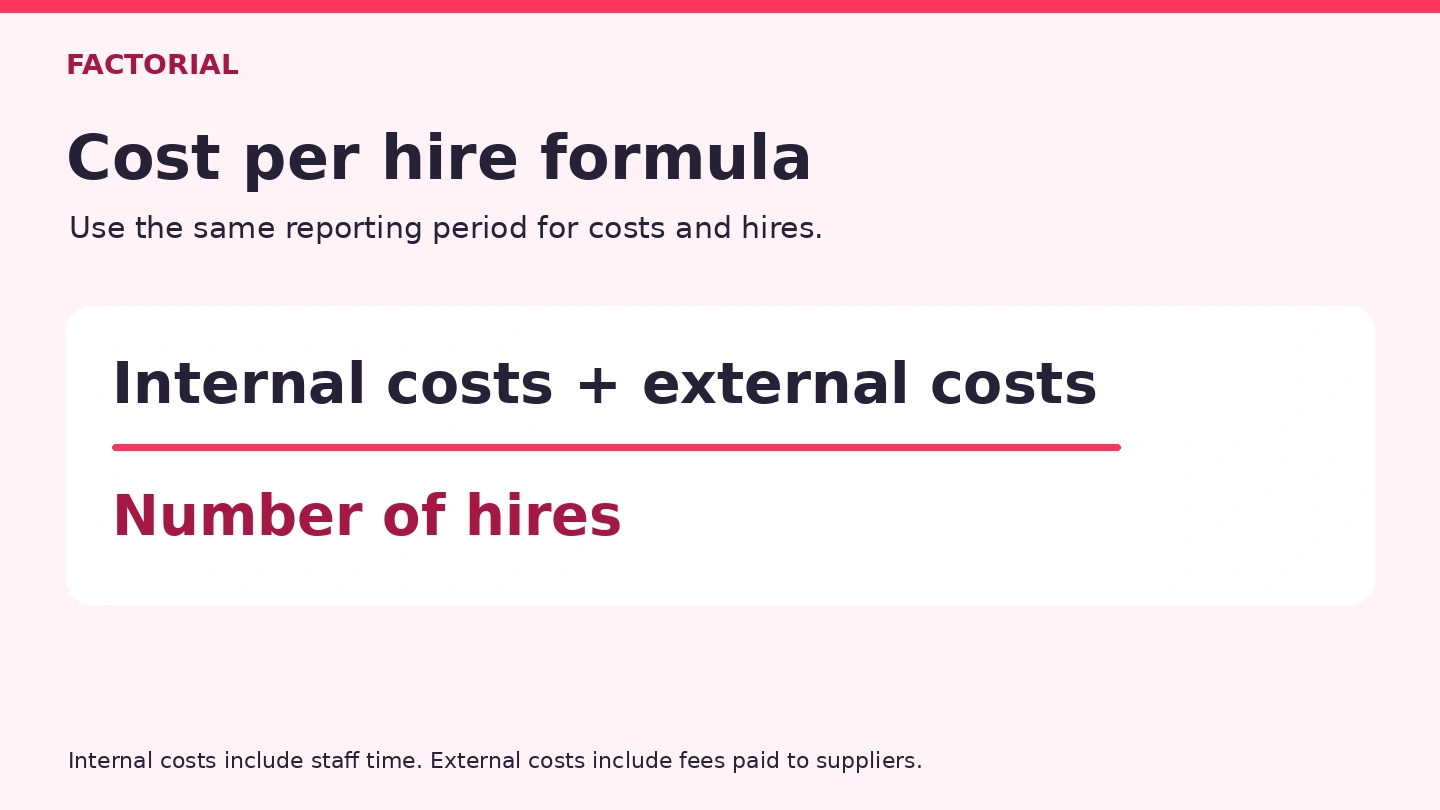
The cost-per-hire formula is a simple one:
Cost-per-hire = (internal recruitment costs + external recruitment costs) ÷ number of hires
When running your calculation, keep these things in mind:
- Choose the period and the area of the business: If you’re reporting on company-wide hiring from April to June, use company-wide recruitment costs and hires for those months.
- Add up the costs: Use invoices and receipts from finance, plus your estimates of staff time and shared costs.
- Count the hires: One simple approach is to count people by the date they actually start. Someone who accepts an offer in March and starts in April counts as an April hire. If you include staff who move into new roles internally, include the relevant costs and records.
- Divide the total costs by the number of hires: If nobody started, show the amount of money spent and that there were zero hires. Mark cost-per-hire as unavailable for that period.
Cost-per-hire calculation example
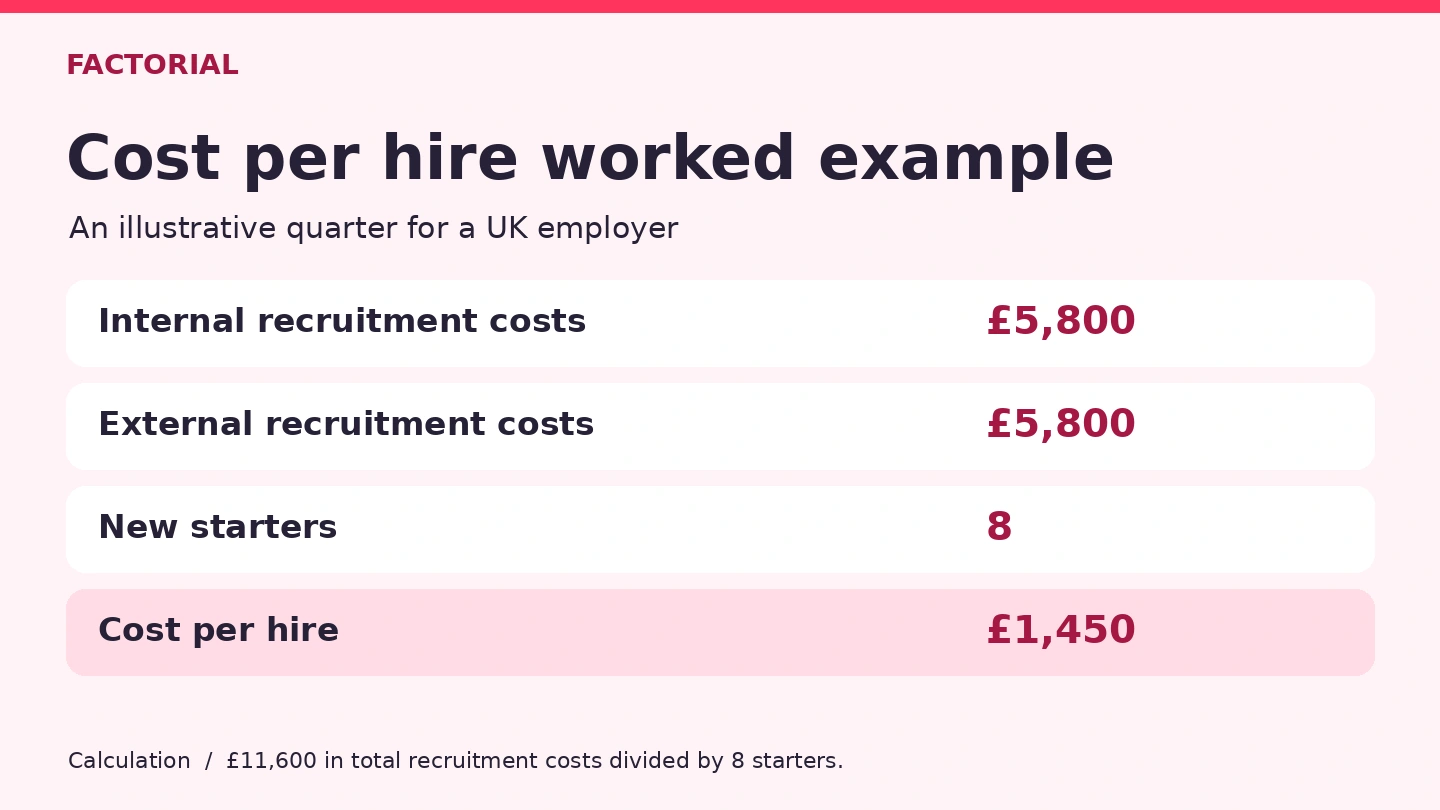
An example may help you understand exactly how CPH works: A UK business hires eight people over three months. Its HR team adds up what it paid for recruitment and what it cost for staff to work on the vacancies. Here’s what the calculation looks like.
| Cost | Amount |
| Recruiter time | £3,200 |
| Hiring manager and interview panel time | £1,600 |
| Recruitment software costs | £600 |
| Employee referral payments | £400 |
| Total internal costs | £5,800 |
| Outside recruitment for specialist roles | £4,000 |
| Job adverts | £1,200 |
| Assessments and screening | £600 |
| Total external costs | £5,800 |
| Total recruitment costs | £11,600 |
| New starters | 8 |
| Cost-per-hire | £1,450 |
You can make a simple Excel calculator to make your task easier. Tocdo this, put internal costs in cell B2, external costs in B3 and the number of hires in B4. In a separate cell, enter =IF(B4>0,(B2+B3)/B4,”N/A”) and format the result as currency.
If you pay for a job advert in May and the new employee starts in June, the spending and the hire appear in different monthly reports. That can make monthly cost-per-hire jump around, especially if you only hire a few people. Looking at three months together can help. If you want to know what it cost to fill one particular vacancy, add up the costs for that vacancy from the day you opened it to the point you finished recruiting.
What is a good cost-per-hire in the UK?
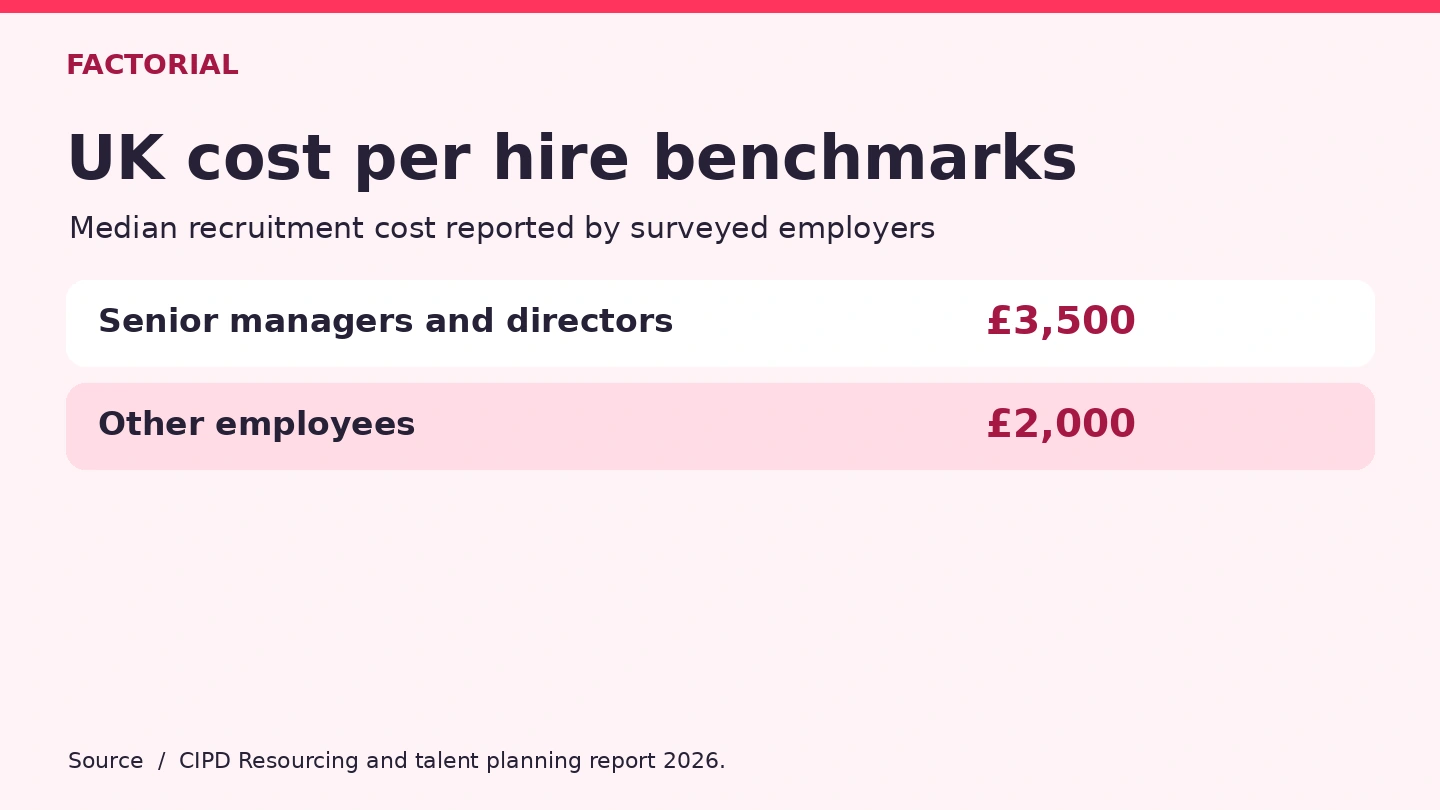
A good cost-per-hire fits your budget and helps you hire people who can do the job and want to stay. In the CIPD 2026 resourcing survey, the median reported cost-per-hire was £3,500 for senior managers and directors and £2,000 for other employees among respondents who could estimate their costs.
If you’re looking for the average cost-per-hire in your industry, check which jobs and expenses the figures cover. Two employers might both recruit a warehouse supervisor, but one might count manager time and screening costs while the other counts only advert fees. For your own budget, compare what you spent on similar roles using the same method.
| Track alongside cost-per-hire | What it helps you see |
| Time to hire | How quickly candidates move through the hiring process. |
| Offer acceptance | How many candidates say yes when you make an offer. |
| Early retention | How many new starters are still with you after a set period, such as three months. |
| Where new starters found the job | Which job boards, referrals or other sources led to hires. |
How much does a bad hire cost a company?
Start with costs you can put a figure on. If someone leaves early and you spend £900 on temporary cover and £1,450 recruiting their replacement, that’s £2,350 in extra costs. Track these separately from what you spent on the original hire. Before changing the interview process, check why the person left. The advert may have given them the wrong impression of the job, or they may have needed more support after starting.
Reducing recruitment costs
List the roles you expect to fill and use recent costs for similar hires. If you expect to hire six frontline employees at £900 each and two specialists at £2,500 each, your starting budget is £10,400. Add any fixed costs your estimates leave out and set aside extra for vacancies likely to take longer or need more advertising.
| If costs rise because… | Try this |
| You spend hours reviewing unsuitable applications | Rewrite the job advertisement so applicants can see the essential skills, location and working hours. |
| You start from scratch each time you fill a similar role | Rely on your talent acquisition strategy for planning recurring hires. Keep role templates and review where previous successful candidates found the job. |
| Interviewers keep asking the same questions | Give each stage a clear purpose and use a shared scoring guide. |
| You keep paying to advertise roles that reopen soon after someone starts | Check whether the role matched the advert and ask new starters what support they needed in their first few weeks. |
Give each planned vacancy an owner and a likely start date, then review the list with finance each month. If a role goes on hold, keep what you’ve already spent in your report. Update the forecast for the remaining adverts, checks or other costs you still expect to pay. That shows how much of the budget is available for other roles.
How can Factorial help reduce your cost-per-hire?
An applicant tracking system keeps applications and hiring stages in one place. For an HR team, that means fewer separate spreadsheets to check when a manager asks who’s ready for interview. For a business owner, it means you can see what’s happening with each vacancy without asking several people for updates. An AI assistant like Factorial can work with you in many ways, but one of the most useful is asking it for a report on cost-per-hire and already having all the data ready in order to get an instant answer. For example, you can use Factorial to:
- Reach more candidates with premium portals and track paid postings from the job opening. Compare how many starters each board produces before paying for another advert.
- Improve job openings with new settings to set up the stages you need and automate routine emails. Reuse job offer questions when you need the same information for similar roles.
- Set up backfill positions when someone leaves. Depending on your setup, it can create a vacancy or a request to hire for that position.
- Plan headcount with financial clarity by reviewing proposed roles, salaries and start dates together.
If you’re hiring for several roles and want an easier way to see where each vacancy stands, explore Factorial’s applicant tracking system. Keep tracking bills and staff time alongside your hires so you can see whether changes to your process save money or free up time.

FAQs about cost-per-hire
For a single vacancy, start with what you expect to spend on the advert, staff time and checks. If you’re hiring for a role you’ve filled before, use the actual costs from that hire as a starting point. Adjust for anything that’s different this time, such as a longer interview process.
CPH is calculated using recruitment costs and the number of hires. If HR and finance get different results, compare the dates, the invoices they counted and the list of starters. One team may have counted accepted offers while the other used actual start dates.
Add internal and external recruitment costs, then divide by the number of hires. To combine two periods, add up the costs and the hires first. For example, £2,000 for one hire and £6,000 for six hires gives a combined cost-per-hire of about £1,143 across seven hires.
Start with expected gross pay and add the costs your business pays as the employer, such as employer National Insurance, pension contributions and benefits. For a first-year budget, add one-off costs such as recruitment and initial equipment on separate lines so you can see what you’ll keep paying in later years. GOV.UK
Employee costs typically include wages or salary, overtime, bonuses, employer National Insurance, employer pension contributions and employer-funded benefits. Depending on what you’re budgeting for, you might also include training, equipment or software used in the role. For part-time employees, start with the pay and hours they’ve agreed to work.