Running projects without the right tools slows everyone down. Deadlines slip, budgets get messy, and people are never quite sure who is doing what. That is why teams are adopting the best AI project management tools to plan work, identify delivery risks, and reduce repetitive administration.
In this article, you’ll learn what AI project management tools actually do, how they help your team every day, which features matter most, and which tools are worth looking at in 2026 and beyond.
Table of Contents
- Key Facts
- What Are AI Project Management Tools?
- What Are the Benefits of Using AI for Project Management?
- Which AI Project Management Features Matter Most?
- How Do AI Project Management Tools Compare?
- Which Are the Top 10 AI Project Management Tools?
- How to Choose an AI Project Management Tool
- Manage Your HR Projects With Factorial’s AI Agent
Key Facts
- AI project management tools use project data to draft updates, automate routine work, identify risks, and support resource decisions.
- Research published in 2025 surveyed 2,000 project professionals across 18 industries and 12 countries on generative AI in project work.
- Only 28% of AI use cases in infrastructure and operations fully met ROI expectations, while 20% failed outright.
- Organizations with strong GenAI support were nine times more likely to report advanced productivity gains.
What Are AI Project Management Tools?
AI project management tools are software tools that use artificial intelligence to help you plan, organize, and deliver projects with less effort and fewer mistakes. They go further than traditional tools that only hold task lists or simple timelines.
Instead of just storing information, these tools:
- Learn from your project data over time
- Spot possible problems early, like delays or budget issues
- Take care of repetitive tasks that usually consume administrative time
In practical terms, modern AI tools can:
- Turn closed deals into active projects without switching tools
- Turn meeting notes into clear action items automatically
- Highlight tasks that are likely to miss their deadlines
- Suggest who should do what, based on people’s workload and skills
- Create status reports automatically so you don’t have to build them by hand

What Are the Benefits of Using AI for Project Management?
Using AI in project management changes how your team spends its time and how confident you feel about your plans. Here are the main benefits your team will see in everyday work.
AI should be evaluated against measurable delivery outcomes, not feature adoption alone. Of the leaders whose AI initiatives faced setbacks, 38% cited skills gaps, and another 38% cited poor data quality or limited data availability as direct causes of failure.
Fewer delays and fewer surprises
AI tools constantly watch what’s happening in your projects. They look at progress, deadlines, and dependencies, then flag early when something doesn’t look right.
What this means for you:
- You hear about trouble early, not when it’s too late
- You can adjust schedules, scope, or staffing before deadlines are missed
- Stakeholders get fewer “we’re suddenly behind” emails
- Instead of spending your time putting out fires, you spend it preventing them.
Faster decisions based on up-to-date info
Project managers often have to make decisions with incomplete data. AI changes that. It pulls information from tasks, budgets, and timelines, and turns it into simple, clear insights.
Benefits here include:
- Clear dashboards that tell you what’s really happening
- Easier choices about where to invest resources
- Less guessing and more confidence in your calls
More time for work that actually matters
A huge amount of project work is admin: updating tasks, writing status reports, chasing people for updates, moving dates around. AI tools can now handle many of these routine jobs.
For example, AI can do the work that slows you down:
- Adjust task dates when one item slips
- Send automatic reminders to people whose tasks are overdue
- Draft weekly or monthly status updates from project data
The result is more time spent on planning, problem solving, and stakeholder communication, which is the work that needs your attention.
Better use of your team’s time and skills
AI tools don’t just look at tasks, they also look at who is doing the work. They can see:
- Who is overloaded
- Who has free capacity
- Who has done similar work well in the past
The tool can then suggest better ways to allocate work, or warn you when someone is at risk of burnout.
This means:
- Workloads are more balanced
- The right people are matched with the right tasks
- You avoid hidden bottlenecks caused by a few people having too much on their plate
Projects are more successful
Because AI helps you catch risks earlier, use people’s time better, and make decisions faster, projects are more likely to succeed. AI doesn’t replace project managers. It frees them to do the things only humans can do, like communicate, and think strategically.
Smoother collaboration, especially for remote teams
AI tools help people stay aligned without endless status meetings. Shared dashboards, automatic updates, and smart notifications mean everyone can see:
- What they personally should do next
- What’s blocking progress
- How their work affects the bigger picture
This is especially helpful for remote or hybrid teams spread across time zones. The tool acts as a single source of truth, keeping everyone on the same page.
How Do AI Project Management Tools Compare?
Before we go into detail, here’s a quick overview of the list of AI project management tools we will cover in this article.
| Tool | Best For | AI Highlights | Starting Price* |
|---|---|---|---|
| Factorial | HR & business teams | AI agent (One), HR + project in one | Custom pricing |
| Visual planning | AI Blocks, risk alerts | $9/seat/month, billed annually | |
| ClickUp | All-in-one work hub | ClickUp Brain, Autopilot Agents | $12/user/month for Core, billed annually |
| Wrike | Risk-heavy work | Copilot, Risk & Triage Agents | Custom pricing |
| Asana | Complex, multi-team work | Asana Intelligence, AI Studio | $10.99/user/month, billed annually |
| Notion AI | Doc-heavy teams | Agent, auto summaries | $10/member/month for Plus |
| Smartsheet | Enterprise portfolios | Knowledge Graph, Smart Agents | $9/member/month for Pro, billed annually |
| Trello | Simple, budget-friendly | Butler automation, basic AI | Free tier at $0 |
| Motion | AI scheduling | Auto-scheduling, time blocking | $19/seat/month for Pro AI |
| Forecast | Resource & budget focus | AI forecasting, workload planning | Custom pricing. Forecast became part of Accelo on May 28, 2026 |
*Please note that pricing may change. Always check pricing online before making a decision.
What are the key AI project management trends in 2026?
- AI agents: Tools increasingly move from answering questions to performing approved, trigger-based actions.
- AI credit models: Teams must compare seat prices alongside included AI usage, add-ons, and overage costs.
- Data governance: Project teams need defined permissions, approved data inputs, and human review for AI-generated outputs.
Organizations with advanced productivity gains are more likely to integrate GenAI into their technology stack, improve project data quality, and strengthen data governance practices.
Which Are the Top 10 AI Project Management Tools?
Here are the top AI project management tools to consider, starting with the one that’s especially strong for HR-focused and operations teams.
1. Factorial: Best for HR and business teams
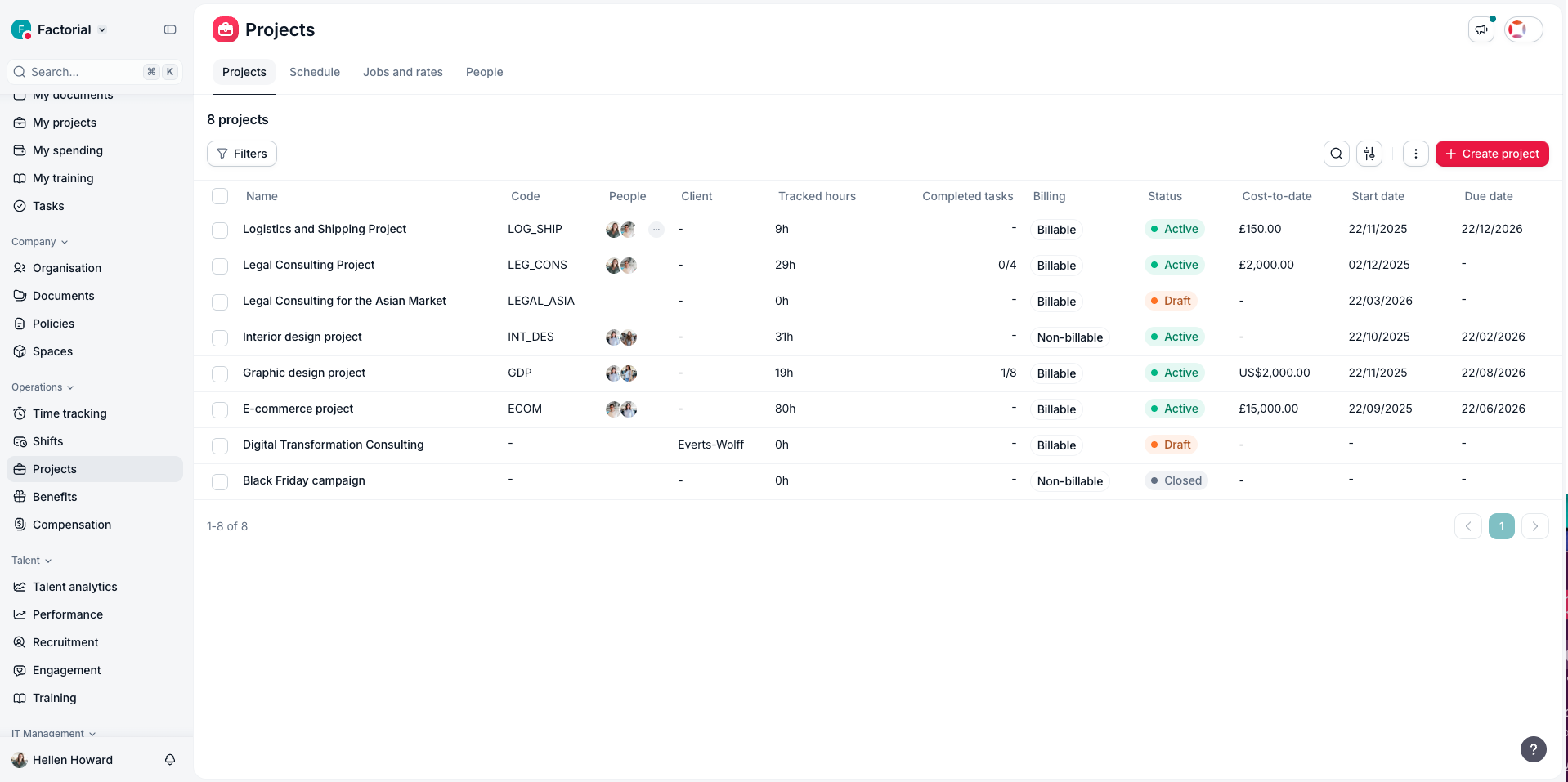
Factorial is an AI for business with a project management software module. It is ideal if you want to manage projects and people in the same place. Most tools only track tasks, but Factorial also connects your HR data, time tracking, and expenses, so you see how projects affect your people and your budget. Manage your HR projects with Factorial’s AI agent and see the platform in action for yourself.
What makes Factorial especially helpful is its AI agent, Factorial One. Think of it as a digital coworker that understands your company’s structure, roles, and processes. It can:
- Answer practical questions like “Which project costs the most right now?” or “How much overtime did the sales team work this month?” in seconds
- Help you write and improve surveys, performance reviews, and internal reports with smart suggestions
- Take over routine tasks such as expense approvals, shift planning, and some recruitment workflows, reducing manual back-and-forth
- Draft job descriptions, summarize resumes, and suggest top candidates so hiring decisions are faster and better informed
Factorial’s project module lets you:
- Build detailed project quotes
- Track profitability at each phase
- Watch budget usage in real time
- Plan team capacity and workloads – all connected with HR and payroll data automatically
What you get with Factorial:
- A single system where you can see who is working on what, how much it costs, and how that lines up with your HR and finance reality, without switching between half a dozen tools.
Best for:
HR managers, operations teams, and businesses that want project management tightly linked with HR, payroll, and finance in one AI platform.
2.
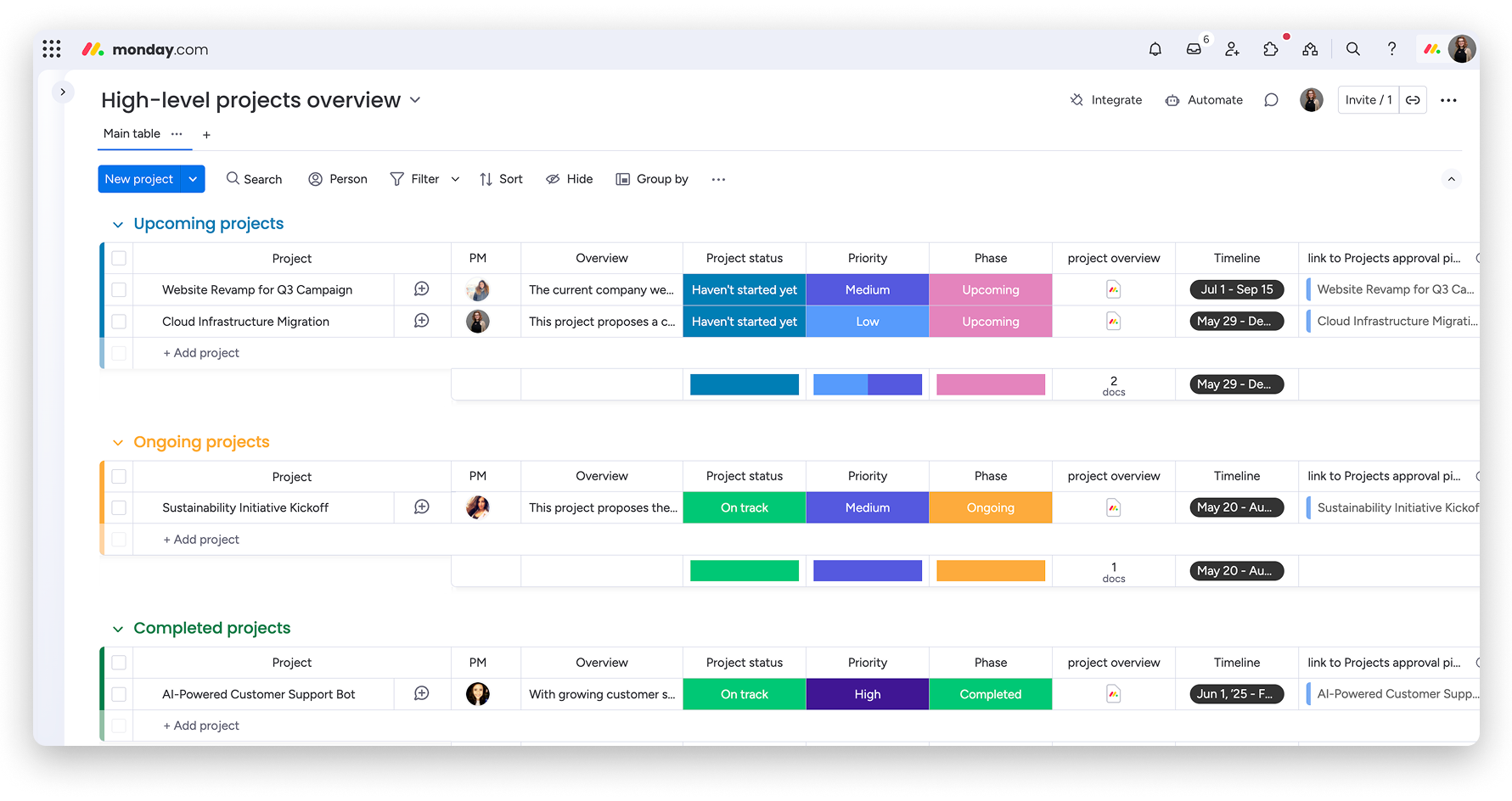
is great for teams that like visual boards and timelines. It’s simple enough for non-technical teams, but powerful enough to run cross-functional work.
How its AI helps you:
AI Blocks can sort tasks, create short summaries, and trigger follow-up actions automatically, so your boards don’t need constant manual updates.
- AI can build a full project structure for you (including milestones and owners) from a simple written prompt.
- It can spot possible scheduling problems or uneven workloads early, so you can adjust before people feel overwhelmed.
- Built-in assistants can grab quick answers for you from internal data and outside sources.
- It also connects well with tools like Google Workspace, Jira, and Slack.
Best for:
Marketing, ops, and mixed teams that like visual planning and want AI to help keep boards up to date and risks under control.
3. ClickUp
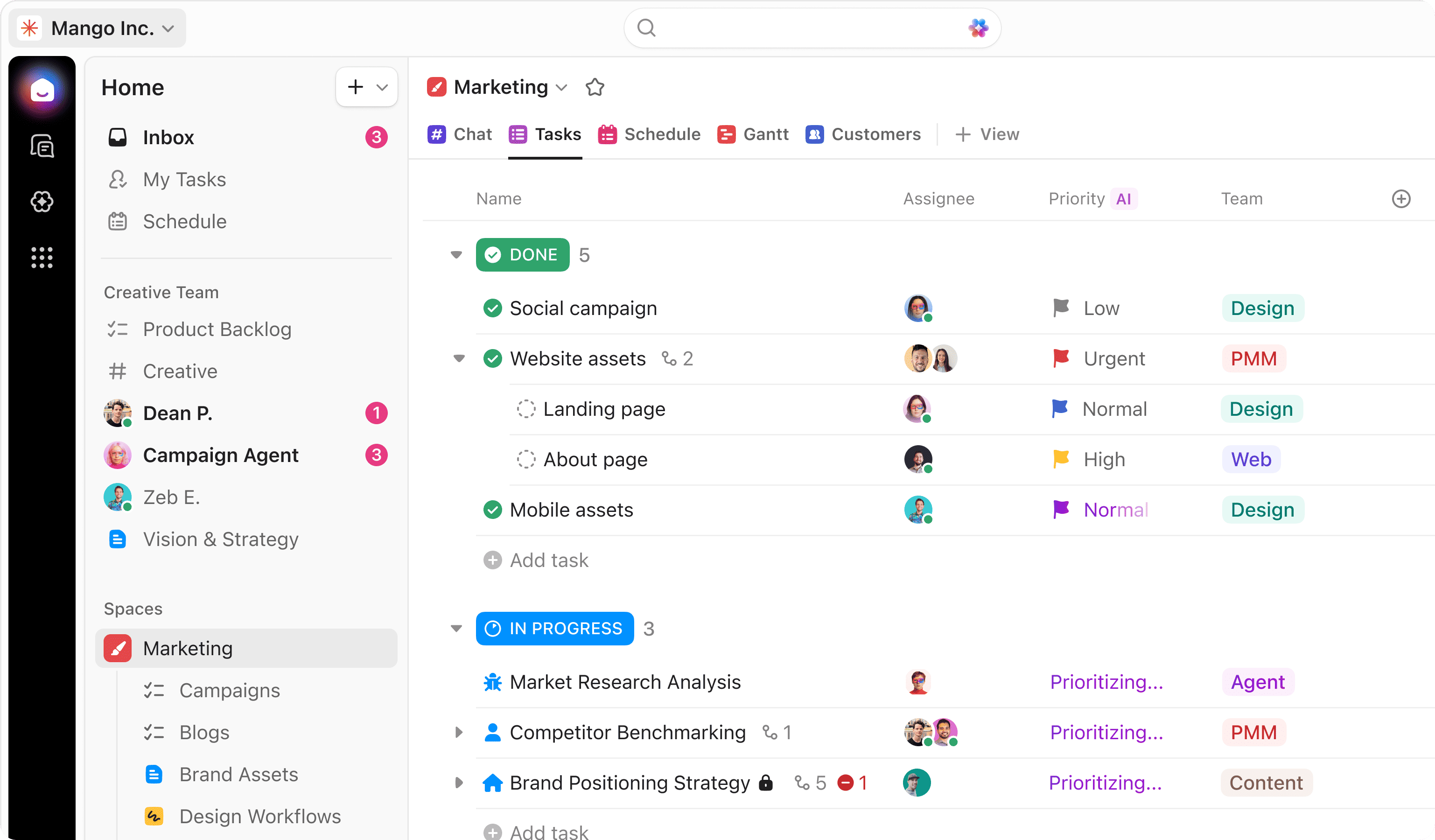
ClickUp is a tool that lets you do everything in one place. Its AI engine, ClickUp Brain, is built into tasks, docs, and goals so you don’t need separate apps for each.
Benefits of ClickUp AI:
- It can fill in missing task details, like priority, due dates, and owners, as soon as you create a task.
- It breaks down vague ideas into clear subtasks and can draft project updates for you.
- It summarizes long comment threads so you can catch up quickly before a meeting.
Autopilot Agents can react to changes in your workspace, for example, re-prioritizing tasks or notifying people automatically based on rules you set.
ClickUp’s Core plan starts at $12 per user per month when billed annually.
Best for:
Teams that want tasks, docs, goals, and AI support all in one, very customizable workspace.
4. Wrike
Wrike is built for larger or more complex setups, and its AI is especially strong at risk detection.
Key benefits:
- Wrike Copilot helps answer questions, summarize work, and keep things moving without you digging through every task.
- A dedicated Risk Agent watches your projects and flags possible issues before they become serious.
- A Triage Agent helps sort and prioritize incoming work so the most important items get attention first.
- An Agent Builder lets you set up your own AI automations to match your team’s processes.
Wrike offers Team, Business, and enterprise-oriented packages, with pricing and AI capacity determined through its plan options.
Best for:
PMOs, large teams, and agencies that need strong risk management and advanced workflow automation.
5. Asana
Asana is well known in the project world and now includes Asana Intelligence, a set of AI features aimed at making complex work easier to manage.
Benefits include:
- Smart Status automatically creates project status updates by looking at subtasks, deadlines, and blockers.
- Smart Summaries turn long task discussions into clear bullet points so everyone can see what’s important.
- Smart Answers let you ask Asana direct questions about your projects and get instant, data-based replies.
- AI Studio connects to documents in Google Drive, OneDrive, and SharePoint so you can turn content into tasks without manual copying.
Asana’s Starter plan begins at $10.99 per user per month when billed annually. It’s common in larger teams with many parallel projects.
Best for:
Cross-functional and enterprise teams that need strong tracking, reporting, and automatic updates across many projects.
6. Notion AI
Notion started as a docs and wiki tool but has become a project hub with Notion AI.
Benefits of Notion AI:
- It can summarize long pages and keep those summaries updated as you edit, so people can skim instead of reading everything.
- It helps you write specs, sprint briefs, project docs, and more from rough notes or transcripts.
- Notion Agent can look across projects and pages, then create weekly plans and highlight things that need attention.
- It connects with other apps through tools like Zapier, so tasks and updates flow in automatically.
Notion Plus costs $10 per member per month.
Best for:
Teams that rely heavily on documents and knowledge sharing, and want their tasks and docs to live together.
7. Smartsheet
Smartsheet looks and feels like a spreadsheet but is built for projects and portfolios. Its AI focuses on large-scale reporting and smart suggestions.
Benefits:
- A Knowledge Graph learns how your people, projects, and processes are connected, then uses that to offer better insights.
- A Smart Agent helps project managers track progress and get recommendations.
- Scenario and “what if” tools let you see how changes in budget or staffing would affect delivery.
- It sends alerts when milestones or deadlines are at risk.
Smartsheet Pro costs $9 per member per month when billed annually.
Best for:
Enterprises and PMOs that need strong portfolio reporting and planning, not just individual project boards.
8. Trello
Trello is built around boards, lists, and cards and is one of the easiest tools to learn. Its AI is basic compared to others but still useful.
Benefits:
- Butler automation lets you set simple rules (for example, “When a card moves to ‘Done,’ mark the due date complete”) so you don’t have to do everything manually.
- Premium plans add AI features like short summaries and suggestions to keep boards tidy.
- AI can help predict delays and adjust timelines in some setups, based on your past work patterns.
Trello offers a free tier at $0, while Standard costs $5 per user per month when billed annually.
Best for:
Small teams, freelancers, and startups that want something simple and visual, plus a bit of automation.
9. Motion
Motion focuses less on managing tasks in lists, and more on building your schedule for you.
Benefits:
- It automatically arranges your tasks into your calendar based on deadlines and importance, and reshuffles them when things change.
- It provides smart time blocking so you don’t overbook yourself.
- It can turn meeting notes into tasks without manual typing.
Motion Pro AI costs $19 per seat per month.
Best for:
Solopreneurs and small teams who want AI to manage their calendar and daily plan, not just task lists.
10. Forecast
Forecast PSA is now part of Accelo following a completed brand integration on May 28, 2026.
Benefits of Forecast AI:
- It can predict which projects are likely to run late and why.
- It suggests how to allocate people so everyone is used well but not overworked.
- It scans project documents and communication for hidden risks you might not notice.
- It creates live reports and alerts so clients and leaders always see up-to-date information.
- It works best when you already have a good amount of project history, so the AI has data to learn from.
Pricing is available through a custom quote request for Forecast PSA by Accelo.
Best for:
Agencies, consultancies, and service teams that need clear insight into both workload and project profitability.

Which AI Project Management Features Matter Most?
Not every AI project tool has the same features and strengths. When you compare tools, keep an eye out for these and think about what each one means in terms of real benefits for your work.
Seeing problems early with Predictive analytics
Predictive analytics simply means the tool looks at old and current projects to guess what might go wrong next. For example, it might see that tasks in a certain phase often run late, or certain types of work usually cost more than planned.
Why it matters:
- You get early warnings about likely delays and budget issues
- You can test “what if” scenarios before you commit
- You make fewer last-minute changes and emergency fixes
Automate task management
With good AI, a lot of admin happens automatically. The tool can:
- Create tasks from meeting notes or project briefs
- Assign them to the right person and set deadlines
- Update statuses as people work, without you chasing them
This matters because it leads to fewer manual updates, less room for human error, and a much lower chance that tasks simply get “lost.”
Ask questions and get answers from Conversational AI
Natural language features let you talk to the tool in regular English, like you would to a colleague. You can ask:
- “What’s at risk this week?”
- “Show me all tasks assigned to marketing that are late.”
The tool then pulls relevant data and gives you a straight answer.
This is useful because you don’t need to learn to use filters or dashboards and anyone on the team can quickly find what they need.
Create reports in seconds with AI
Instead of building reports manually, AI can:
- Pull data from tasks, comments, and timelines
- Highlight key wins, risks, and delays
- Draft readable status reports you can send to your stakeholders
This allows you to stay transparent and communicative with much less effort, and leaders get the information they want in a format they understand.
Factorial One learns your design guides as well as your data, and can also create presentations for stakeholders from these reports.
Manage resources and workloads easily
AI tools let you see who is doing what across your projects and keep workloads balanced. They can flag:
- People who are overloaded
- Teams that are underused
- Projects that don’t have enough people assigned
With this, you can avoid burnout and make sure each project has enough support to finish on time.
Detect risks and monitor progress
Good AI tools constantly watch your projects for warning signs, like:
- Tasks stuck in the same status for too long
- Budgets that are being used faster than planned
- Dependencies that are not being met
Instead of manually checking everything regularly, you get alerts when you actually need to take action.
Governance and human review controls
AI-generated schedules, risk alerts, and status updates should remain reviewable before they affect project commitments. The National Institute of Standards and Technology identifies four core AI risk-management functions: Govern, Map, Measure, and Manage.
Integration with HR and finance systems
If you manage projects that involve people’s hours and costs (almost all do), it’s very useful when your project tool connects to HR and finance systems.
Why it matters:
- You see labor costs and capacity alongside project progress
- External invoices are linked directly to active projects
- You can plan based on reality, not guesses
- You get cleaner reporting for leadership and clients
For HR-led initiatives, Factorial’s AI project management software is particularly useful when project estimates, employee capacity, tracked time, and expenses need to be reviewed in the same operational workflow.
How to Choose an AI Project Management Tool
Choosing the right AI project management tool is mostly about matching it to your real needs and your team.
Run a short, measured pilot
- Select one repeatable workflow, such as weekly status reporting or meeting follow-ups.
- Test the workflow with real project data and defined permissions.
- Measure a delivery outcome, such as reporting time, overdue tasks, or forecast accuracy.
- Review AI output quality before expanding access or automation.
Define clear outcome measures, improve project data quality, and establish governance before scaling GenAI in project work.
Know your main goal
Decide what you care about most right now and pick the tool that directly solves your biggest pain first.
Check how well it connects with integrations
Make sure the tool connects to the systems you already use like HR and payroll, Slack, Teams, Google Drive, CRM or ticketing tools.
If it doesn’t connect well, you’ll end up doing manual copy-paste, which kills most of the AI benefits.
Not all AI is equal
Look past the AI hype and ask:
- Does it just automate basic actions, or can it actually warn you about risks and suggest better plans?
- Can you ask questions in plain language and get useful answers?
- Does it help with real decisions, or just update tasks?
Choose tools that clearly show you risks, capacity, and next steps, and not just flashy labels that don’t actually contribute to results.
Match the tool to your team size
Small teams need simple tools, larger teams need stronger reporting. If the tools feel too complicated for your size, adoption will be slow.
Test for ease of use
In a trial or demo, watch how your team would react:
- Can people figure out basic tasks without a long training?
- Do dashboards feel clear or overwhelming?
- Does it fit how you already work, or force you into a new process?
The right tool is one your team can adopt consistently while delivering measurable improvements in project visibility, reporting time, or risk management.
Think in terms of value, not just price
Don’t only compare subscription fees. Ask:
- How many hours per week could this save us?
- How many delays or budget surprises might it prevent?
- Will it help reduce stress for the team?
If a tool frees up even a few hours per person each week and avoids one or two failed projects, it usually pays for itself quickly.
Before enabling AI actions across a portfolio, confirm what the tool can access, which actions require approval, and how the team will measure success. Among leaders with successful AI use cases, 33% attributed success primarily to embedding AI into the systems and processes people already use.
Manage Your HR Projects With Factorial’s AI Agent
AI tools can transform how you run projects, but the biggest gains happen when your project data, people data, and budget all live in one place. That’s where Factorial stands out. By combining project management with HR and payroll, Factorial helps you see who’s doing what, how much it costs, and where work might be at risk, without juggling multiple tools.
With Factorial’s AI agent acting like a digital coworker, your team spends less time on manual updates and more time actually moving projects forward. If you want to see how this works with your own workflows and team structure, request a demo of Factorial and explore how AI-powered project management and HR can work together for your business.
Disclaimer: The information presented on this page is based on publicly available sources. The comparisons between Factorial and other providers are intended solely for the illustration of the respective software features, pricing and functionalities. All information regarding features, prices, and integrations may be subject to change without prior notice. Factorial assumes no liability for the accuracy, completeness, or timeliness of the information presented. We recommend contacting the respective providers directly to obtain the most accurate and up-to-date information. All legal regulations regarding Spanish fair advertising and competition law are fully observed by us, if you have any concerns, please reach out to us. The comparisons presented do not constitute a final evaluation or recommendation for any provider, but serve solely as an informational source.
FAQ
Is there an AI app for project management?
Yes, many AI project management apps are available. These tools use artificial intelligence to automate administrative tasks, predict project risks, balance team workloads, and provide data-driven insights, helping you deliver projects with fewer delays and mistakes.
What are the best AI project management tools?
The best tool depends on your specific needs. For businesses that need to connect project management with HR and finance, Factorial is the ideal solution. Already an all-in-one business management software, it has now become the first AI for business, and provides a unified view of project costs, profitability, and team capacity.