Handwritten time logs are a thing of the past. Top time tracking software helps U.S. businesses record work hours, absences, PTO, and overtime data more accurately. The right platform can reduce manual administration while giving managers clearer attendance and workforce reporting.
This comparison reviews 11 time tracking tools by features, workforce fit, and current pricing so you can identify the right option for your business.
How we assessed the tools: The ratings below reflect each platform’s timekeeping features, reporting, payroll connectivity, mobile access, workforce fit, and publicly available pricing. Confirm product capabilities during a live demo or trial because plan availability can change.
What is Employee Time Tracking Software?
Employee time tracking software is typically an online tool hosted in the cloud, created to assist businesses in logging employees’ work hours and activities. Despite its straightforward nature, the information these tools offer is highly valuable. They enable employers to monitor employee attendance, work hours, and tasks, providing valuable insights into performance.
What Does Employee Time Tracking Software Do?
Various time-tracking software options come with different features, so selecting the right one requires understanding your needs in advance. Let’s begin by examining some features commonly found in standard time-tracking solutions:
1. Time Tracking:
- Clock: This feature eliminates the need for manually filling out timecards or time logs and typically provides more accurate information about your employees’ working hours.
- Timesheets: Timesheets offer detailed time recording beyond simple clocking in and out, allowing employees to document their daily or weekly work hours, overtime, breaks, and various types of paid time off.
- Task and Project Tracking: Some time-tracking software doubles as productivity tools, enabling employees to track time spent on specific tasks or projects. This is especially beneficial for businesses that bill clients based on hours worked or agile teams managing multiple projects.
2. GPS and Location Tracking
GPS and location tracking can help field teams verify worksite attendance and reduce disputed clock-ins. Employers should use it only for a defined business purpose, communicate the policy clearly, and limit collection to work-related time.
3. Payroll Integration
Many time-tracking platforms connect with payroll systems or support payroll-ready exports. Automated approvals can reduce manual data entry, but HR teams should still validate pay rules, PTO balances, overtime, and exceptions before payroll is finalized.
4. Reporting and Analytics
Time-tracking software also has the ability to generate reports based on productivity levels and hours spent on specific tasks or projects. This allows your team to gain more insight and make adjustments accordingly to enhance the workflow.
5. Compliance and Legal Requirements
The Fair Labor Standards Act does not require one specific timekeeping technology, but covered employers must keep accurate wage and hour records. The U.S. Department of Labor states that any method is acceptable when records are complete and accurate. State and local rules may impose additional requirements.
What Are the Benefits of Employee Time Tracking Software?
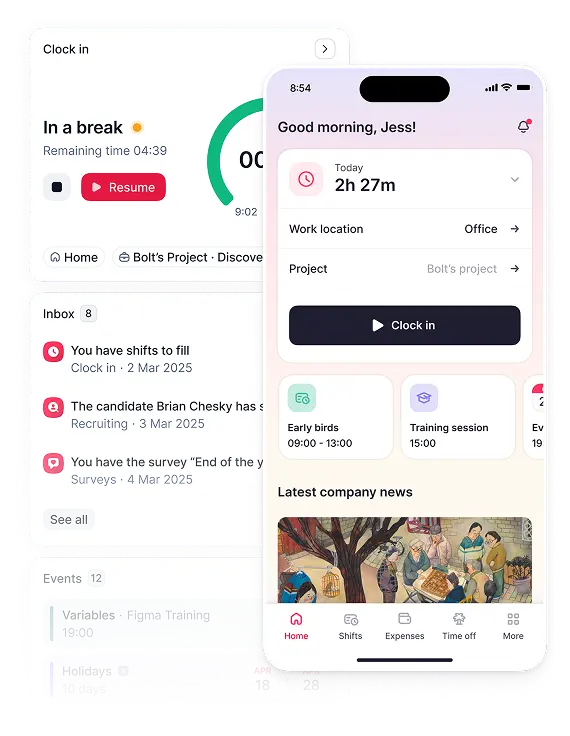
Manual time logs served a purpose. Apart from the obvious, time recording gave us insight to how much time was spent on specific tasks or projects. Check out the benefits time tracking software can provide your team:
- Enhances Accuracy: Improve data precision and minimize errors linked to manual attendance tracking. Additionally, many systems provide real-time reporting and analytics, enabling your business with insights into attendance trends and patterns, facilitating data-driven decision-making in workforce management.
- Boosts Productivity: Identify attendance patterns promptly and address issues before they affect productivity. Time management software also enables employees to take charge of their productivity by offering visibility into their time and building accountability. Moreover, it reduces HR and management administrative burden by eliminating manual data entry and simplifying processes.
- Supports Remote Work: Modern time-tracking solutions accommodate remote work arrangements by allowing employees to clock in and out from various locations, enhancing their engagement with your organization.
- Enhances Security: Cloud-based time-tracking systems offer improved data security compared to physical record storage. Additional security features, such as restricting access to specific data, aid businesses in meeting stricter security requirements.
How Do You Choose a Time Tracking System?
So, you’re ready to look at the world of time-tracking systems. What’s next? Here are some guiding questions to help you navigate the selection process and find the right software for your organization:
| Workforce need | Features to prioritize | Questions to ask during evaluation |
|---|---|---|
| Office and hybrid teams | Web and mobile clock-ins, timesheets, PTO, approvals | Can managers review exceptions before payroll? |
| Field and frontline teams | Mobile clock-ins, kiosk mode, schedules, GPS controls | Can location collection be limited to work time? |
| Project-based teams | Task codes, billable hours, budgets, reporting | Can reports show utilization and project costs? |
| Multi-location employers | Permissions, audit trails, payroll exports, integrations | Can the system apply location-specific pay rules? |
-
Is it User-Friendly?
- Ensure the software is easy to use for both employees and managers. Complex systems can lead to resistance and errors.
-
Does it Ensure Accuracy?
- Look for a system that minimizes errors in attendance tracking and reporting.
-
Is it Scalable?
- Choose software that can grow with your organization, accommodating current and future needs.
-
Does it Integrate with Your Systems?
- Check if the software can integrate with your existing HR, payroll, and other relevant systems to simplify processes.
-
Does it Offer Customization?
- Consider if the software allows customization to meet your specific requirements, such as mobile accessibility, biometric features, and compliance options.
-
What Reporting Capabilities Does it Offer?
- Evaluate the reporting and analytics features to ensure they provide insights tailored to your needs.
-
Who Will Manage the Software?
- Determine the support and training needed for software management and assess the level of customer support available.
-
How Secure is it?
- Prioritize data security by selecting software with robust security features to protect sensitive attendance data.
-
Consider the Cost.
- Understand the pricing structure, including subscription fees, implementation costs, and ongoing expenses.
-
What Do Others Say?
- Research user reviews and case studies to gauge the software’s effectiveness and reliability.
-
Is it Compliant with Regulations?
- Ensure the software complies with data regulations, especially if your industry has stricter requirements.
Before making your final decision, take advantage of free trials offered by software providers to test multiple options. Additionally, involve key stakeholders from various departments, including IT, to ensure alignment with organizational needs from the outset.
For growing teams that need attendance, PTO, schedules, and reporting in one place, Factorial, all-in-one business management software, provides time tracking alongside broader workforce-management workflows. This can reduce the need to reconcile employee time data across separate systems.
1. Factorial ⭐️⭐️⭐️⭐️⭐️

Overview
Factorial’s Time Tracking solution simplifies time management for businesses, simplifying the process of tracking employee working hours. This enhances productivity and reduces absenteeism. The software offers easy customization, allowing you to set work schedules, compare actual hours worked to expectations, monitor remote work, and tailor tracking for individual employees.
Key features include daily time tracking, shift approvals, and simplified management of extra hours, all contributing to increased productivity. Attendance monitoring, location-based clock-ins, and customizable permission settings help reduce absenteeism by providing the right visibility to the appropriate individuals. The mobile app and Slack integration make time tracking convenient, while robust reporting and absence management tools offer valuable insights for informed decision-making.
You can also try our free work hours calculator here.
Pros
✅ Comprehensive HR Management Features: Factorial distinguishes itself with its extensive HR management capabilities, providing a wide array of tools and functionalities to simplify workflows for human resources teams.
✅ User-Friendly and Accessible Design: Many users appreciate the software’s user-friendly interface, which is easy to navigate and features an attractive design, contributing to a positive user experience.
✅ Integration Capabilities: The software smoothly integrates with popular email and chat tools like Outlook and Slack, facilitating smoother workflows and increased efficiency.
Cons
❌ Undergoing Continuous Improvement: While Factorial’s software functionality is solid, users can expect ongoing enhancements and additions as the platform continues to evolve and expand its offerings.
Pricing
Plans start at $8 per user per month, with pricing varying by selected modules and workforce requirements. View all customizable bundles, or chat with an HR product specialist to help you decide. You can also book a free demo to discuss the right configuration.

2. Timely ⭐️⭐️⭐️⭐️

Overview
Timely is a software for business management like Factorial that allows you to digitize and automate time logs. It offers time-tracking capabilities and is designed to accommodate businesses of any size, stage, and budget.
Timely enables businesses with accurate payroll, project management, team management, and capacity planning reporting. It also simplifies timesheet administration, enabling teams to focus on meaningful work while prioritizing user-level privacy.
Pros
✅ User-Friendly: Timely’s system is highly intuitive and consistently praised by users as “excellent.” It is particularly favored by teams handling bookings, marketing, and invoices. Smooth integration with Google Calendar and a convenient widget function for embedding into other tools are appreciated features.
✅ Affordable Pricing: Timely offers a reasonable pricing structure, making it a cost-effective solution for businesses.
✅ Responsive Support: The standout customer support team is known for its responsiveness, helpfulness, and accessibility. The company is dedicated to listening to feedback and continuously improving the platform.
Cons
❌ Customer Dissatisfaction: Some users have encountered significant issues with the software, resulting in dissatisfaction and attrition.
❌ Limited Functionality: While Timely offers a broad range of features, users have noted missing functionalities that can impede their processes. Common complaints include the inability to apply customer credit to invoices already issued and the lack of an option to cancel appointments online.
Pricing
Annual-billing plans start at $9 per user per month, while monthly pricing starts at $11 per user per month. Higher-tier plans and custom enterprise pricing are also available.
3. Toggl Track ⭐️⭐️⭐️⭐️

Overview
Toggl Track is a versatile time-tracking app designed to boost productivity for individuals and large cross-functional teams alike. It features a user-friendly interface, real-time tracking synchronization across devices, and robust reporting capabilities.
Toggl Track simplifies time management and eliminates manual administrative tasks, offering flexibility and integration with various project management and invoicing tools. This makes it an invaluable solution for businesses seeking efficient time tracking and reporting. Not only can big businesses benefit from Toggl Track, but this is a useful time tracker for consultants as well.
Pros
✅ Effortless Task Tracking: Toggl Track simplifies the task tracking process, enabling users to effortlessly monitor their activities, gain insights into time allocation, and improve overall focus and productivity.
✅ Smooth Integration: Toggl Track smoothly integrates with Asana and other tools, providing a valuable solution for teams looking to optimize their time management and task tracking within existing project management workflows.
✅ Excellent Free Version: Toggl Track’s free version offers comprehensive features and services, allowing users to quickly set up and start time tracking without requiring a subscription.
Cons
❌ Difficult to Use: Some users have faced challenges in understanding how to effectively use Toggl Time. One main concern is the inadvertent loss of logged hours due to users not tracking their time when they believed they were.
❌ Lack of Pause Function: The absence of a pause feature for tracking sessions in Toggl Track has proven problematic for many users. Instead of pausing, users must stop their current session and start a new one, leading to multiple short-duration sessions. Correcting time entries can be frustrating, as minor errors often revert changes back to default entries.
Pricing
The Free plan supports up to five users. Starter costs $9 per user per month with annual billing or $12 monthly, while Premium costs $18 annually or $20 monthly.
4. Clockify ⭐️⭐️⭐️⭐️

Overview
Clockify is a versatile and free time-tracking app designed to meet the needs of teams of all sizes and industries. It enables users to monitor work hours, set hourly rates, and manage tasks smoothly, catering to diverse businesses such as digital agencies, NGOs, and educational institutions. With features like customizable reports, billable hour tracking, and cross-device accessibility, Clockify ensures efficient time management and productivity analysis.
Pros
✅ User-Friendly and Cost-Efficient: Clockify provides a straightforward and budget-friendly solution with robust features available in its free version. Users appreciate its easy sign-up process, intuitive interface for organizing tasks, and mobile app for convenient time tracking on the go, making it especially valuable for remote and mobile teams.
✅ Comprehensive Support: Clockify offers an extensive library of resources accessible under the Help tab, including documentation, tutorials, and support materials, enhancing the overall user experience.
✅ Easy Billing and Invoicing: Clockify simplifies the process of calculating billable hours and generating invoices directly from inputted data, making it a preferred choice for agencies and freelancers.
Cons
❌ Confusing Reporting: Some users have found the reporting features in Clockify to be confusing, which has occasionally impacted their ability to obtain accurate time logs.
❌ Difficulty in Editing Time Entries: Users have reported difficulty in editing time entries within the app, particularly if they forget to start or stop the timer.
Pricing
A free plan is available. Paid plans start at $5.49 per seat per month with annual billing, or $6.99 per seat per month with monthly billing.
5. TimeCamp ⭐️⭐️⭐️⭐️

Overview
TimeCamp is a versatile and cost-effective time-tracking software ideal for teams of all sizes. It provides accurate timesheets, detailed reports, and automatic real-time tracking, enabling businesses to project profitability and forecast employee performance accurately. TimeCamp’s flexibility extends to integrating with various applications, making it a comprehensive system for project management and productivity optimization, suitable for both in-office and remote teams.
Pros
✅ User-Friendly Interface: TimeCamp features an easy-to-use, clean interface that users find simple and intuitive, contributing to a positive experience in tracking and managing their time and projects. It also integrates smoothly with other productivity tools, such as Asana.
✅ Enhanced Focus and Productivity: Users frequently commend TimeCamp for its ability to help them maintain focus on completing projects. It facilitates task tracking and enables users to review weekly progress, enabling teams to take control of their productivity and time management.
✅ Reliable Uptime and Support: TimeCamp’s consistent internet availability is a significant advantage for users who depend on uninterrupted access. The platform’s technical support is also helpful and responsive, ensuring users receive prompt assistance.
Cons
❌ Costly Investment: Some users have found TimeCamp to be relatively expensive compared to the value it provides, leading them to seek alternative time-tracking solutions.
❌ Difficulty in Adjusting Time Entries: Adjusting time entries, particularly for accidental runs, poses a challenge within the platform. Users are concerned about how this might impact the accuracy of time tracking. Additionally, occasional software glitches have caused timers to malfunction on other platforms.
Pricing
A free plan is available. Annual-billing plans start at $3.99 per user per month for Starter, $6.99 for Premium, and $9.99 for Ultimate.
6. QuickBooks Time ⭐️⭐️⭐️⭐️

Overview
QuickBooks Time, part of the QuickBooks suite, is highly regarded for its smooth integration with popular accounting tools like QuickBooks Online and ADP. This comprehensive solution enables businesses to efficiently manage their workforce, projects, and payroll all within one platform.
QuickBooks Time simplifies employee time tracking and scheduling, simplifying payroll, invoicing, and job costing processes. It provides the flexibility for teams to track time from anywhere using various devices and is smoothly embedded within QuickBooks, offering a smooth experience for reviewing and approving employee time data without leaving the QuickBooks environment.
Pros
✅ Exceeds Expectations: Users consistently express satisfaction with QuickBooks Time, often finding it to offer more features than anticipated.
✅ Impressive Customer Service: QuickBooks is renowned for its excellent customer service and support, and QuickBooks Time maintains this reputation. Users appreciate the responsiveness and helpfulness of the support team in addressing their issues and challenges.
✅ User-Friendly Interface and ADP Integration: QuickBooks Time features a user-friendly interface, making it accessible even to those with limited computer knowledge. Its compatibility with the ADP system enhances the software’s usability for specific needs.
Cons
❌ Occasional Technical Glitches: Some users have encountered occasional technical issues with QuickBooks Time, such as difficulties in clocking out or starting a new timesheet. These functionality errors, especially those related to QuickBooks integration, have caused frustration among users.
❌ Software Lag and Timing Issues: Reports have surfaced regarding instances where the time clock function of the software lags by a few seconds. This delay or occasional missed clock-in/out can be attributed to the software’s slowness, leading to frustration for some users.
Pricing
Time Premium costs $10 per month plus $10 per user per month, while Time Elite costs $20 per month plus $12 per user per month.
7. RescueTime ⭐️⭐️⭐️⭐️

Overview
RescueTime is a web-based productivity tool crafted to enhance efficiency and focus for its users. By tracking time spent on various applications and websites, it aids in preventing distractions, providing teams and individuals with insights into their daily habits and bolstering productivity.
With over 14 years of expertise in time-tracking, RescueTime stands as a trusted leader in habit-building software, assisting users in setting goals, tracking time, and managing distractions effectively.
Pros
✅ Valuable Additional Resources: Users have discovered that RescueTime offers more than just time tracking, it provides a treasure trove of time management articles and productivity courses via its website. The high-quality content in these resources has motivated users to regularly utilize RescueTime, making it a valuable platform for enhancing productivity and time management skills.
✅ Effective Time Management: RescueTime enables users to manage their time effectively by offering insights into time allocation, enabling informed decisions about how they utilize their hours, and ultimately boosting productivity. Users particularly appreciate RescueTime’s ability to showcase how and where they spend the majority of their time.
Cons
❌ User Experience and Interface Could Be Improved: Some users have noted that while RescueTime is functional, it lacks a polished and refined user interface and experience.
❌ Limited Use for Individual Projects: While RescueTime proves useful for tracking time on basic projects, some users believe its capabilities are better suited for team collaboration and larger-scale projects.
Pricing
The Focus plan costs $7 per month when billed annually. Timesheets plus Focus costs $12 per month for individuals, while team plans start at $10 per user per month annually.
8. Connecteam ⭐️⭐️⭐️⭐️

Overview
Connecteam is a versatile workforce management app crafted to simplify business processes and bolster productivity. It enables managers to automate tasks, freeing up their time to focus on business growth.
This time-tracking app offers employees flexible tools to boost productivity, including custom checklists, task management features, skills development resources, and a GPS-enabled time clock for tracking work hours and scheduling shifts. Furthermore, it simplifies employee communication, supports skills development, and simplifies daily task management.
Pros
✅ Customizable Features: Connecteam offers flexibility, ensuring a simplified and efficient experience tailored to your organization’s specific requirements.
✅ Clear and User-Focused: Its straightforward design and ease of use make it accessible for users of all technological abilities.
✅ Cost-Effective Pricing: The pricing structure is transparent, allowing users to upgrade without encountering hidden fees.
Cons
❌ Limited Compatibility: Connecteam’s admin features are accessible only through the website, not the app. Additionally, the app is available solely on Android and iPhone platforms, lacking a desktop app for Windows or Mac.
❌ Lack of Advanced Permissions: The platform lacks advanced hierarchy features and customizable permissions for administrators, potentially limiting the level of control and customization some organizations may require.
Pricing
Pricing is organized across Operations, Communications, and HR hubs, with fixed pricing for the first 30 users. For additional users, Operations Basic starts at $0.80 per user per month with annual billing.
9. Insightful ⭐️⭐️⭐️

Overview
Insightful is a robust workforce analytics and productivity software designed to provide actionable data insights for optimizing employee performance and efficiency. It offers employee productivity monitoring, automatic time-tracking, and remote team management to enhance productivity and simplify workflows.
Trusted by over 1,000 global brands, Insightful delivers behavioral data insights to enhance organizational productivity. This user-friendly platform is available in the Cloud or On-Premise, ensuring enterprise-grade security and privacy. It’s the go-to solution for businesses looking to improve their workforce analytics.
Pros
✅ Comprehensive Time Tracking: With a user-friendly interface featuring start and stop timers, task switching, and break recording, Insightful makes it easy for employees to accurately log their work hours.
✅ Customizable Features: Insightful offers flexible and customizable features tailored to specific needs, including goal setting, project deadlines, and automated reminders for breaks and tasks.
✅ Employee Monitoring: Insightful’s employee monitoring capabilities enable website and software tracking, providing valuable insights into employee productivity.
Cons
❌ Missing Features: Insightful lacks certain features, such as the ability to attach website URLs to projects.
❌ User Management Limitations: Users can only be deactivated and cannot be unmerged once merged.
Pricing
Pricing is based on the selected plan from $8 per month for Workforce Analytics. Custom deployment options are available.
10. Harvest ⭐️⭐️⭐️

Overview
Harvest is a versatile time-tracking and project-management tool crafted to simplify work processes. It simplifies time tracking, gains insights from previous projects, and facilitates efficient payment collection. With native apps and integrations with popular tools like Asana and Slack, Harvest smoothly integrates into team workflows and offers a variety of visual reports to ensure project smoothness and team support.
Moreover, Harvest also enables teams in turning tracked time and expenses into invoices with integrated online payment capabilities.
Pros
✅ Exceptional Time-Tracking: With features like built-in notifications and auto-adjustments, Harvest provides a user-friendly tool for accurately tracking time.
✅ Smooth Integration: Harvest smoothly integrates with various project management tools, making time tracking across different platforms effortless.
✅ Ease of Use: Setup is fast and straightforward, and task allocation and timesheet functions are easily accessible.
Cons
❌ Lacks Viewing Options: Harvest only offers a one-day view and lacks calendar or monthly review features.
❌ Limited Functionality for Internal Departments: The platform is primarily designed for agencies working with multiple clients and billing for their services, which means internal departments within a company might need to work around certain structural elements.
Pricing
A free plan is available. Teams starts at $9 per seat per month with annual billing or $11 monthly, while Enterprise starts at $14 per seat per month annually or $17.50 monthly.
11. BambooHR ⭐️⭐️⭐️

Overview
BambooHR offers a comprehensive time tracking software solution that smoothly integrates various functions and tasks, simplifying operations and enhancing efficiency. Furthermore, the platform automates various processes, thereby ensuring smooth workflows throughout the employee lifecycle. In this way, BambooHR consolidates employee, payroll, time, and benefits information into a single, centralized location, all while maintaining data accuracy and security. Its user-friendly design ensures accessibility and ease of use, even on mobile devices.
Pros
✅ Accessible User Portals: BambooHR provides distinct portals for users, allowing employees to manage their own records, track time off, and electronically sign documents, while HR managers have separate access to the tools they require.
✅ Smooth Interface: The platform features an easy-to-navigate interface that provides smooth access to features for both administrators and end-users.
✅ Simplified Time Tracking: BambooHR’s mobile app simplifies time tracking and enables company-wide announcements to reach everyone, regardless of their location.
Cons
❌ Complex Custom Reporting: Creating custom or specialized payroll reports within the platform can be time-consuming.
❌ Limited Functionality in Core Platform: Users may need to purchase and integrate additional systems through a “bolt-on” approach to access certain functionalities.
Pricing
Plans for organizations with more than 25 employees start at $10 per employee per month for Core, $17 for Pro, and $25 for Elite.
Which Time Tracking System Is Best for Your Business?
The best choice depends on how your team works. Prioritize reliable time capture, clear approval workflows, payroll-ready reporting, and appropriate privacy controls. For small and midsize businesses that want time tracking connected to broader HR operations, Factorial may be a strong option in this comparison.

FAQ
What are the top 10 timesheet software options?
Top timesheet software options automate time tracking to improve accuracy, boost productivity, and ensure compliance. Key features to look for include detailed reporting, project tracking, mobile access with GPS, and smooth integration with payroll systems. These tools are essential for managing both in-office and remote teams effectively.
What is the best time tracking software?
The best time tracking software simplifies time management while integrating with other essential business functions. Factorial, an all-in-one business management software, offers robust time tracking, attendance monitoring, and reporting to enhance productivity and simplify payroll, making it an ideal choice for businesses of any size.