An employee portal is a secure online space where employees can access their own work information, documents and useful company resources. This can include payslips, contracts, schedules, policies, benefits and training.
The best employee portals make checking this information quick and easy. Instead of searching through emails, shared folders or different systems, employees have one clear place to go when they need something.
The features people use most are usually the simplest ones: finding a document, checking a shift or opening a payslip. Before you read on to learn more about what makes an employee portal useful, watch our video on how you can give employees one simple place to find information, complete everyday tasks and get what they need without searching across different systems.
What is an employee portal?
An employee portal is the part of an HR or business system that employees use themselves. It gives each person a secure place to access information connected to their job.
An employee portal may include:
- payslips
- contracts
- work schedules
- holiday information
- company policies
- benefits
- training
- onboarding information
- personal employment documents
Some portals also let employees complete tasks. Others are mainly used to store and find information. For employees, the main benefit is that they know exactly where to look for the things they are searching for.
Which employee portal features do people use most?
The most useful employee portal features are usually the ones people need regularly. These are the features that give employees a reason to come back to the portal.
Payslips
Payslips are one of the most useful features in an employee portal. Employees may want to check their latest pay or download an old payslip for a mortgage, rental application or another reason. Keeping payslips in the employee portal means people do not need to search through old emails.
GOV.UK says employers must normally give employees and workers a payslip on or before payday. Payslips can be provided electronically, making an employee portal the perfect way to distribute them. Most platforms, like Factorial, for example, let you set up an automated workflow that sends employees an email when a new document, like their payslip, has been uploaded to the portal.
Contracts and work documents
Employees also need access to important work documents like agreements.
This may include:
- employment contracts
- offer letters
- salary letters
- company handbooks
- training certificates
- signed forms
An employee portal keeps these documents in one place. This means employees can find them when they need them instead of asking HR to send another copy. It also makes employee records management easier because documents can stay linked to the right employee.
Work schedules
For shift workers, the schedule may be the part of the employee portal they use most.
Employees want to know:
- when they are working
- where they are working
- when a shift starts
- when it ends
- whether anything has changed
The latest schedule should be easy to find. This is much simpler than checking spreadsheets, printed rotas or long message threads where you agreed on the hours.
Holiday information
Employees also use portals to check their own holiday information.
They may want to see:
- upcoming holiday
- previous bookings
- remaining leave
- whether a request has been approved
The employee portal gives them a clear overview of their own information. The request and approval process is an HR self-service feature, which is very common in employee portals like in Factorial. The portal should make the employee’s own holiday information easy to see.
Company policies
Employees need to be able to find company policies in case they have questions about how your organisation handles certain situations. This is most important during the onboarding phase, but any person from your team may want to return to the employee handbook when a question comes up.
An employee portal can give people one place to look for policies on:
- annual leave
- expenses
- remote working
- sickness
- parental leave
- travel
- workplace conduct
Employees should not need to know which shared drive folder contains the latest version of the policy. The portal should make the current policy easy to find. Factorial’s AI agent lets you ask your questions directly and get an instant answer as well as a link to the source document.

Benefits
An employee portal can also make company benefits easier to understand and access.
Employees may want to check:
- which benefits are available
- which benefits they already have
- how a benefit works
- where to find more information
If this information is spread across PDFs and different systems, employees may not know what is available. Putting it in the employee portal gives benefits more visibility, especially if you create a knowledge base of your company’s inner workings for employees and link to it in their portal dashboards.
Training
Training can also be made easier inside an employee portal.
Employees may need to see:
- courses assigned to them
- training deadlines
- training they have completed
- certificates received
- mandatory learning paths to follow
This gives employees a place to check what training they still need to complete. Read more on training and development for more tips.
Onboarding information
An employee portal can be useful from an employee’s first day.
A new starter may use it to find:
- their contract
- company policies
- onboarding tasks
- training
- useful documents
If employees find the portal useful during onboarding, they are more likely to keep using it later. Our guide to employee onboarding best practices explains how to make this process easier.
What makes employees actually use an employee portal?
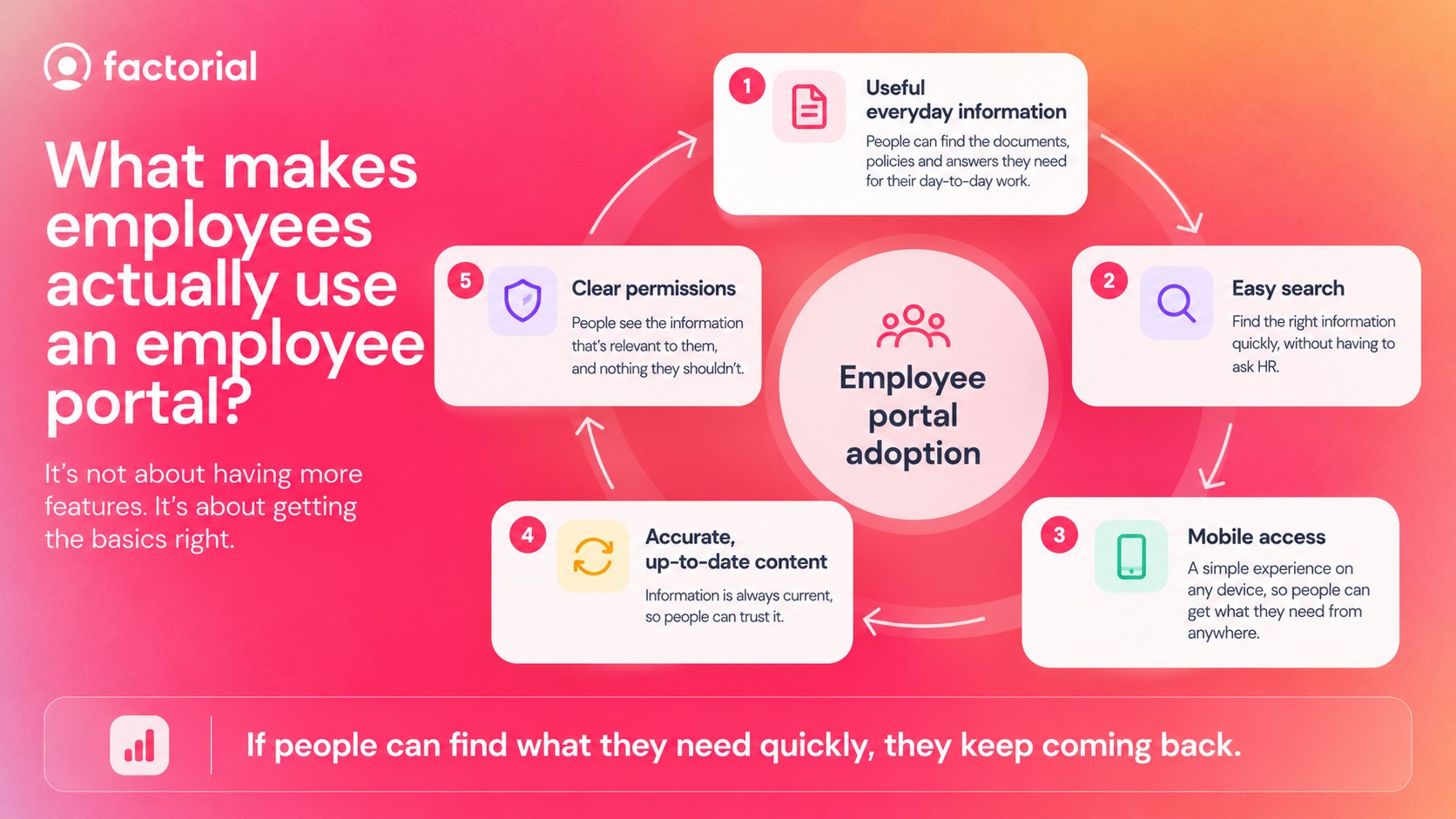
Employees will keep using an employee portal if it is easy to use, useful and always up to date. If people cannot find what they need in the employee portal, they will stop using it. It should make tasks easier, not more complicated.
Important information should be easy to find
The most common features should be easy to see immediately. Add these to your main dashboard if you are making your own portal.
A simple home screen might show:
- newly uploaded documents
- next shift and timesheet
- upcoming holiday
- important reminders
- training or performance review progress
The portal should strike the perfect balance between providing enough information at a glance and not being overwhelming. Employees should not need to click through lots of menus.
Search should be simple
A good employee portal should make documents and information easy to find. If someone needs the travel policy, they should be able to search for it directly without the need to remember which folder it is in.
The portal should work on mobile
Not every employee works at a desk. In fact, many employees would use a phone instead to find things. Industries like retail, hospitality, warehouse, care and field workers will most certainly use their phone more than a computer. For these employees especially, mobile access is very important.
The information should stay up to date
Employees will stop trusting a portal if the information they find on it is wrong half the time. An old schedule, missing document or outdated policy can quickly send people back to email or HR. The ICO says you should take reasonable steps to keep workers’ personal information accurate and up to date as an employer.
How is an employee portal different from an intranet?
An employee portal is usually more personal than an intranet and customised for each individual. An intranet often contains information for the whole company. An employee portal can show information linked to the person who has logged in.
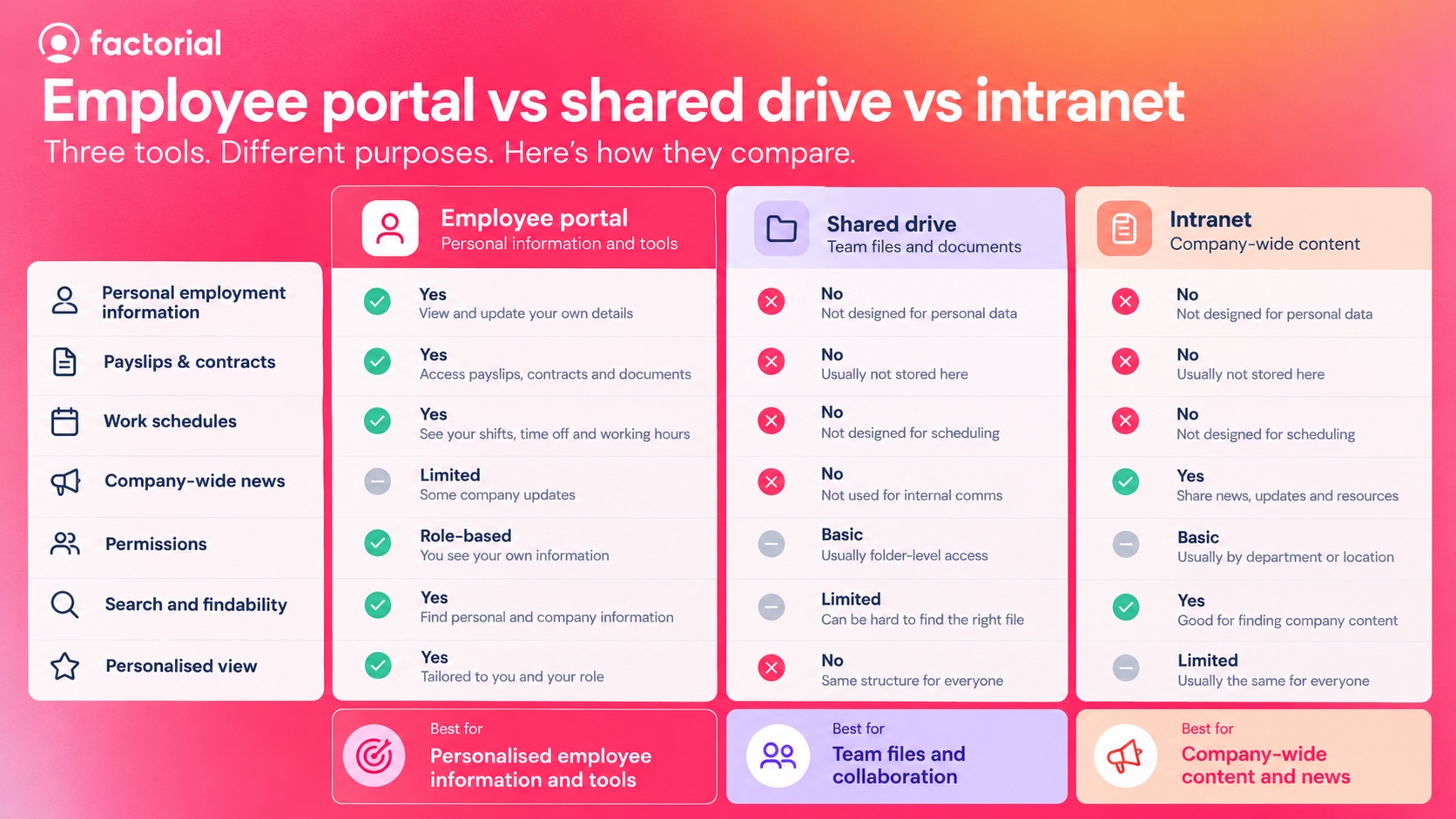
An intranet system and an employee portal can overlap, and some companies use both, but the main difference is that an employee portal can show information specific to each employee.
| Employee portal | Company intranet |
|---|---|
| Personal payslips | Company news |
| Personal documents | General policies |
| Individual schedules | Department information |
| Personal training | General learning resources |
| Personal benefits information | General benefits information |
Is an employee portal better than a shared drive?
An employee portal is usually better for personal employment information. A shared drive is mainly designed to store files. An employee portal is designed around the convenience of the employee.
| Shared drive | Employee portal |
|---|---|
| Built around folders | Built around the employee |
| Often needs manual searching | Shows relevant information directly |
| Mainly stores files | Can include files and other work information |
| Same structure for many people | Can show a personal view |
| Permissions can become complicated | Access can follow employee permissions |
A shared drive can still be useful for team files, but employees should not have to search through large branching folders to find their own contract or payslip.
How does Factorial make employee portals easier to use?
Factorial is an AI business management platform that brings employee information and everyday work tools together. Employees can use Factorial to access things such as documents, time off, schedules, expenses, onboarding, training and benefits from one place.
This means they do not need to remember which system holds each piece of information. Factorial’s AI agent One can also make information much easier to find. Your team can ask questions as if chatting with a colleague and get help finding information they already have permission to access. This makes the employee portal simpler to use because people do not always need to know where something is stored in order to find it. Explore Factorial’s employee portal to see how employee information and everyday tools can be brought together. Request a free demo to understand the true potential of One!

FAQs about employee portals
An employee portal is a secure online place where employees can access work information and tools. This can include payslips, contracts, schedules, policies, benefits and training.
Start by choosing an HR platform that gives employees secure access to their own information. Keep the portal simple, include the features people use most and make sure documents and data stay up to date.
The best employee portals are easy to use and give employees quick access to useful information. Look for features such as documents, payslips, schedules, mobile access, search and clear permissions.
The best HR portal depends on your business and workforce. A good option should be easy for employees to use, secure and able to bring important HR information and everyday tools into one place.
An employee self-service portal is an employee portal that also lets people complete HR tasks themselves. For example, they may be able to request leave, update personal details, find documents or submit expenses.