Expense reporting software gives U.S. businesses a structured way to capture receipts, apply spending policies, route approvals, and document reimbursements. It reduces manual follow-up while giving finance and HR teams a clearer record of travel, mileage, meals, and other business expenses.
Expense reporting software can help manage all employee expense reports, from taking clients out to dinner to taking an early-morning cab to the airport. It facilitates the process because employees upload receipts and managers can easily review them on their own time. AI can take things one step further, by matching expense claims with their receipts, and checking policies to see if they should be validated or not. In this post, we’ll help you find the expense reporting software that’s right for you.
Table of Contents
- Key Facts
- What Is Expense Reporting Software?
- Why Use Expense Reporting Software?
- What Are the Advantages of Expense Reporting Software?
- Which Expense Reporting Software Features Are Essential?
- How Should You Evaluate Expense Reporting Software?
- Expense Report Management Solutions
- How Should Small Businesses Choose Expense Reporting Software?
- Final Thoughts on Expense Reporting Software
Key Facts
- Expense reporting software centralizes receipt capture, policy checks, approvals, reimbursement records, and expense analysis.
- For 2026, the Internal Revenue Service optional business mileage rate is 72.5 cents per mile.
- A review of 2,402 occupational-fraud cases found median losses of $104,000 per case.
- Under the Internal Revenue Service’s accountable-plan safe-harbor timing rules, expenses are generally substantiated within 60 days and excess reimbursements are returned within 120 days.
What Is Expense Reporting Software?
Expense reporting software, or expense management software, lets staff submit business expenses, attach supporting documentation, and request reimbursement. Managers can review claims in one place, apply policy rules, and approve or reject them with a documented decision trail. It’s important to remember, however, that not all software is created equal.
Each system might offer unique capabilities that make it appealing to a certain business. For example, while one organization might value software integrations, another may prioritize the ability to run reports on expense data. Try to find a platform that fits your needs specifically – and your budget.

Why Use Expense Reporting Software?
Efficient, effective expense reporting software keeps businesses on top of expenditures without all the tedious paperwork. This becomes more important as you scale, but helps avoid errors with companies of any size. Ideal expense reporting solutions will make it easy to log travel and business expenses. They’ll also keep the business compliant with IRS rules as well as federal and state laws.
Here are some advantages to using expense reporting software:
Reduce receipt chasing, not recordkeeping
Staff should not have to search bags and inboxes for documentation weeks after a purchase. The Internal Revenue Service generally requires documentary evidence for lodging and for other expenses of $75 or more, so software should capture receipts and required business details when the expense is submitted.
Employees shouldn’t have to block out time specifically for filing their expenses – with their credit card statement open in one window, their calendar in another, and a half-typed email to their supervisor in the third. Don’t put your employees (or yourself) through it! It’s time to automate.
No waiting with expense reimbursement software
Employees file expense reports and then spend weeks waiting for an update. Is the report waiting for the boss’s approval, already in the finance department, or in tomorrow’s paycheck? When they follow up, they get told to ask someone else and then someone else again. Everyone wastes valuable time tracking down the status of expense reports. And when, finally, expense claims are rejected, employees don’t even have visibility into what went wrong. All this confusion reduces productivity and employee satisfaction.
For teams using an accountable reimbursement plan, configure submission and escalation rules around Internal Revenue Service safe-harbor timing of 60 days to substantiate expenses and 120 days to return excess reimbursements. The Internal Revenue Service also identifies a 30-day window for advances made before an expense.
Settling accounts is difficult and confusing
Managing expenses doesn’t have to be painful! Are you wasting time trying to track down outstanding expenses? Pulling out your hair to cross-reference and enforce company policies? Working too hard to keep everyone in the loop? Frustration is a great sign that it’s time to invest in expense management software.
What Are the Advantages of Expense Reporting Software?
With the right expense management tool, you can eliminate the struggle. Take your expense management online with software that digitizes your receipts, automates workflows, and creates custom reports on spending. Boost employee satisfaction and limit liability along the way! Here’s what you can do with software:
Upload and track expense reports
With expense reporting software, employees can upload their expenses directly to a centralized platform. They can use a mobile app to upload a picture of the receipt the moment it has been signed. This means no more lost receipts, no more months-late receipts, and no more bottom-of-the-bag illegible receipts. Digitizing documents will help with record-keeping and running reports down the road.
Automate expense report approvals
Managers can create custom fields for employees to select when they submit their expenses. With categories such as “food,” and “transportation,” software makes it easy to see where company money is going. Managers can also create workflow automations designating supervisors who must sign off the expense. Meanwhile, employees can see the status of their requests at any time and receive notifications of updates. Automation keeps the process moving and makes sure nothing gets lost along the way.
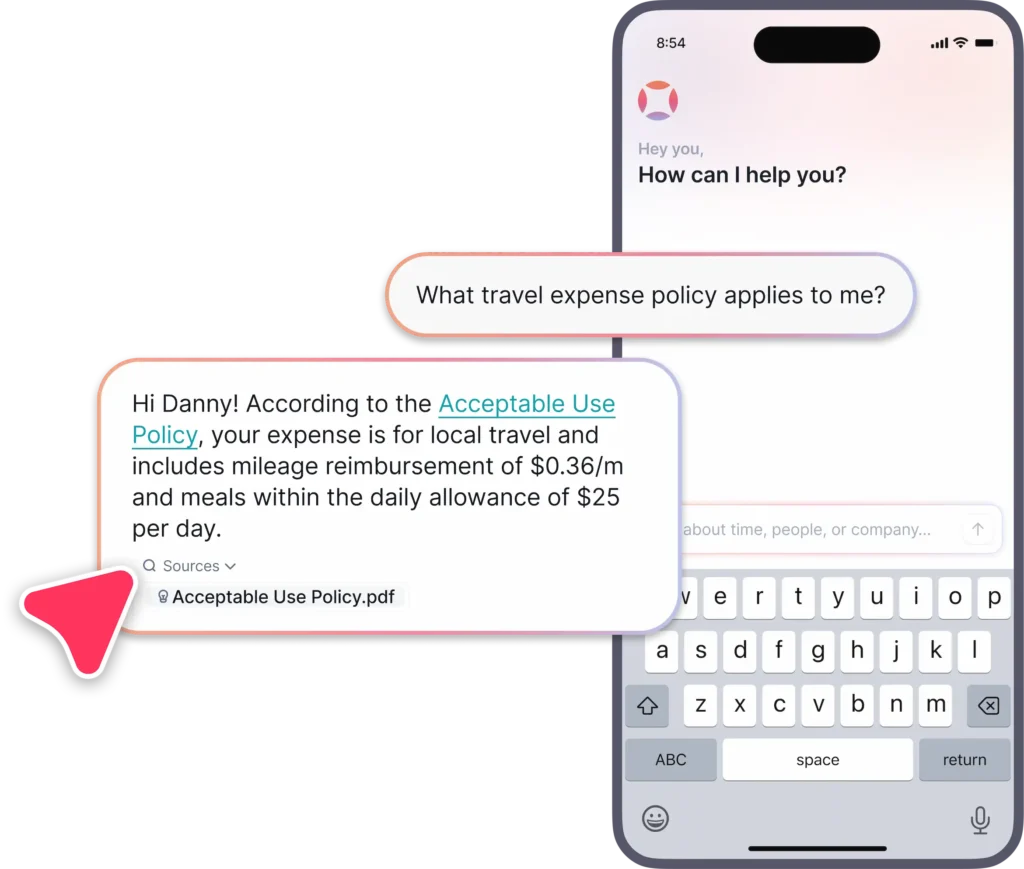
For example, workflow automations in Factorial can send an expense request to the right approver as soon as it is submitted, creating a documented approval path without relying on email follow-up. Factorial’s AI, One, can check expenses against policies and recommend whether an expense should be approved or not. You can even let One auto-approve expenses up to a certain amount.
Analyze expenses in reports
Not all software will provide insight into your company’s spending habits, but the top expense management software will be able to break down employee expenditures and show possible cutbacks. Managers can run custom HR reports by project, by the employee, or by time period. This makes it easier to stick to a budget and introduce cost-saving measures if necessary.
If you’re still managing expenses manually, you may be missing out on a wealth of information that can inform your company’s strategy. One can draw from all your company data, facilitating analysis of both team and individual expenses.
Increase transparency
When it comes to expense reports and reimbursement requests, it’s easy to see why employees want to be kept in the loop. Using software means that company policies are automatically enforced. Employees will have clear reasons when their expense reports aren’t approved and will feel they are being treated more fairly. They can also track the progress of their requests on their own, cutting down on time spent hand-wringing or following up. Transparency increases employee satisfaction and productivity.
Limit liability with records
Expense management tools can support compliance with company policy, Internal Revenue Service substantiation requirements, and applicable state reimbursement rules. The Internal Revenue Service advises retaining records that support a deduction for generally three years after filing the related tax return. Keep all your documents and expenses in the clear with employee record management software.
Which Expense Reporting Software Features Are Essential?
Top expense management systems automate invoicing and approval processes. For a more in-depth discussion of what to look for in expense management software, you can check out our previous post. Here, we’ll briefly revisit expense management solutions that might interest you. For example, basic expense management software should include:
- Accessibility via a mobile app
- On-the-go receipt scanning or uploading
- Expense tagging and categorization
- Customizable expense approval workflow
- Configurable expense policies
- Expense reporting capabilities
- Integrations with other systems
| Selection area | What to verify |
|---|---|
| Capture | Mobile receipt upload and required fields |
| Controls | Policy checks, spend categories, and approval routing |
| Finance | Reimbursement status and accounting integration |
| Records | Searchable receipts, audit trail, and exports |
Some systems may also include:
- Document managers for capturing receipts and centralizing records
- Data analytics gives managers insight into expenditures
When seeking the best expense management software, managers need to keep their eye on the ball. The needs of small businesses and medium-sized businesses will be different from larger entities. In order to find great software, take a close look at your business’s needs and choose a system that will offer support where it is most needed.
For travel-heavy teams, also assess mileage and per diem controls. For FY 2026, the U.S. General Services Administration standard rate for unlisted continental locations is $110 for lodging plus $68 for meals and incidental expenses, although location-specific rates may be higher.

How Should You Evaluate Expense Reporting Software?
Evaluate expense reporting software against the workflows your organization actually uses: receipt capture, policy enforcement, approval routing, reimbursement visibility, reporting, and accounting integration. The right system should make required information easy to submit and easy for managers to review.
Automation
Expense management software should automate your workflow so that you can concentrate on other things. Once a receipt is uploaded or expense reported, does the software route it to the appropriate supervisor for approval? Is it automatically formatted for an expense report? With workflow automations, Factorial sends expense approval requests as soon as staff submit them. This helps organizations create consistent routing and reduce approval bottlenecks.
Integrations
A comprehensive HRMS software, Factorial comes fully integrated with a fleet of other features: with a document manager, payroll summary, data visualization tools, and more. All this is already factored into the pricing plan. When evaluating integrations, confirm which accounting, payroll, and document-management connections are included in the selected plan. Also confirm whether expense data can be exported in the format finance teams need for reconciliation and audit preparation.
Reporting Capabilities
Excellent expense management solutions should avenues for visualizing and analyzing data. With Factorial, managers can categorize expenses by date, department, project, or type. They can then use this data to run custom HR reports, tracking the organization’s expenses by time period, project, or employee. Information such as this can help drive strategic decision-making and keep expenditures down. Reporting should let managers filter expenses by date, department, project, employee, merchant, and category. These fields make recurring policy exceptions and budget variances easier to identify.
Mobile App
In today’s fast-moving society, you need software that has a mobile app. This makes expense tracking much easier, as employees can upload pictures of receipts directly from the restaurant table. Therefore, there’s no chance for any data to get lost! The mobile app which accompanies Factorial software is intuitive and well-designed. With it, managers will be able to accept reimbursement requests on the fly and employees will be notified immediately. A mobile app should allow staff to capture receipts, enter expense details, check approval status, and respond to rejected claims without waiting to return to a desktop device.
Factorial’s Expense Reporting Software
Utilizing the right tool can make the biggest difference in your daily operations. That’s why it’s so vital to fully take advantage of technology to improve your workflows. Watch the short video below to see how Factorial can help you gain control over your expenses!
Expense Report Management Solutions
For small or medium-sized businesses, Factorial may be a better bet. With an excellent expense management program folded into a comprehensive HR software, Factorial keeps expense tracking simple. Factorial also has a clear payment structure so that employers don’t have to worry about any unforeseen costs. Factorial offers a chance to try out its expense management software before committing. That way you and your team can test drive the functionalities and make sure they fit with your workflow.
In short, the right expense management solutions will make your expense reporting process easier, keep your records centralized, and drive expenditures down. Get your budget in order today.
How Should Small Businesses Choose Expense Reporting Software?
Small businesses often need to stick to a tight budget. While corporate expense management may have a larger margin for mistakes, small businesses must keep close tabs on employee spending. That’s why small businesses are choosy about expense management software. In order to find the best expense management system to help your business to stick to its bottom line, remember to ask yourself about the following:
Is the interface user-friendly?
Choose software that employees want to use. If the interface is clean, intuitive, and attractive, everyone wins. Employees will be more likely to upload their receipts in a timely manner and managers will have an easier time reviewing them. Make sure the platform you use has a mobile app! No one has time to do everything by computer these days, and an app makes a big difference to user experience.
Is it compatible with other platforms?
When looking for travel and expense reporting software, make sure to find one that will work well with the tools you already use. Better yet, find an expense management software that has other complementary capabilities such as holiday leaves scheduling and payroll. That way, you can make all necessary adjustments on a single platform. With Factorial’s all-in-one HR software, expense management is folded into other features like a document management system and shift manager. This means nothing ever gets lost in translation.
Is it secure?
Expense reporting software for small businesses should protect financial and employee data through documented access controls, vendor-risk practices, and incident-response procedures. The National Institute of Standards and Technology Cybersecurity Framework 2.0 organizes security risk management around six functions: Govern, Identify, Protect, Detect, Respond, and Recover. Factorial guarantees security with:
- Role-based access for submitters, approvers, and finance administrators
- Audit logs showing edits, approvals, rejections, and reimbursements
- Documented data-retention and deletion practices
- Export controls and approval records that support internal audits
Final Thoughts on Expense Reporting Software
Expense management software can help take your company to the better. It will save employees and managers time, cut company costs, and boost productivity. It also leads to increased compliance with company policy. Most of all, it can give you the data to run a tight ship and make strategic decisions that help your company move forward. No matter where you’re going, good expense management will help you get there.
Set policy rules before launch, including required receipt thresholds, expense categories, approver levels, mileage treatment, reimbursement deadlines, and exceptions. The Internal Revenue Service generally allows a 50% deduction for unreimbursed business meals, while entertainment expenses are generally nondeductible.

FAQ
How do you do expense reports?
Employees create expense reports by logging business-related expenditures. Using expense management software, they can upload receipts and categorize spending for submission. This automates the approval workflow, allowing managers to review requests on a centralized platform and ensuring timely reimbursement for the employee.
How to manage expenses?
The most efficient way to manage expenses is with dedicated software. This allows you to digitize receipts, automate approval workflows, and generate reports on company spending. A centralized system increases transparency for employees, ensures compliance, and provides valuable insights to help control costs.
What is the best way to keep track of small business expenses?
The best way for a small business to track expenses is with a user-friendly, integrated system that centralizes record-keeping and provides insights into spending. Factorial, an all-in-one business management software, offers expense management alongside other key functions, making it an ideal solution for controlling costs.
What is the best app to manage business expenses?
The best apps for managing business expenses allow employees to upload receipts on the go and automate the approval process. Factorial, an all-in-one business management software, includes an intuitive mobile app for expense tracking that simplifies submissions for employees and approvals for managers, making it a top choice.