HR self-service lets employees find HR information and complete simple tasks without having to contact HR every time. They can check holiday balances, find work documents, update their own details, submit expenses and get answers to common questions themselves.
Self-service is useful in HR because a lot of working time is lost simply trying to either find information or find where to update information. Factorial’s Business Facts Index found that 48.8% of surveyed business leaders lose two to three hours out of every ten working hours searching for information held by another department, checking conflicting data or repeating administrative work that had already been done.
HR self-service helps cut some of this work. Instead of asking HR for a payslip, contract, holiday balance or address change, employees can deal with many of these tasks themselves. That means quicker answers for employees and fewer small requests landing with HR. Before you read our article on HR self-service and find out exactly how much admin it can help cut, watch this video on corporate vs generic LLMs to understand why an AI agent that knows your business can make self-service even easier to implement.
HR self-service is often discussed from the employee’s point of view, but managers can save time too. Read our article on manager self-service for a better understanding of the benefits.
What is HR self-service and what can employees do with it?
HR self-service is a way for employees to access HR information and complete routine tasks themselves through an employee portal, HR system or app. You may also see it called employee self-service or ESS.
The way it works is based on a simple idea. Employees should not need to email HR every time they need information that already exists somewhere in the company.
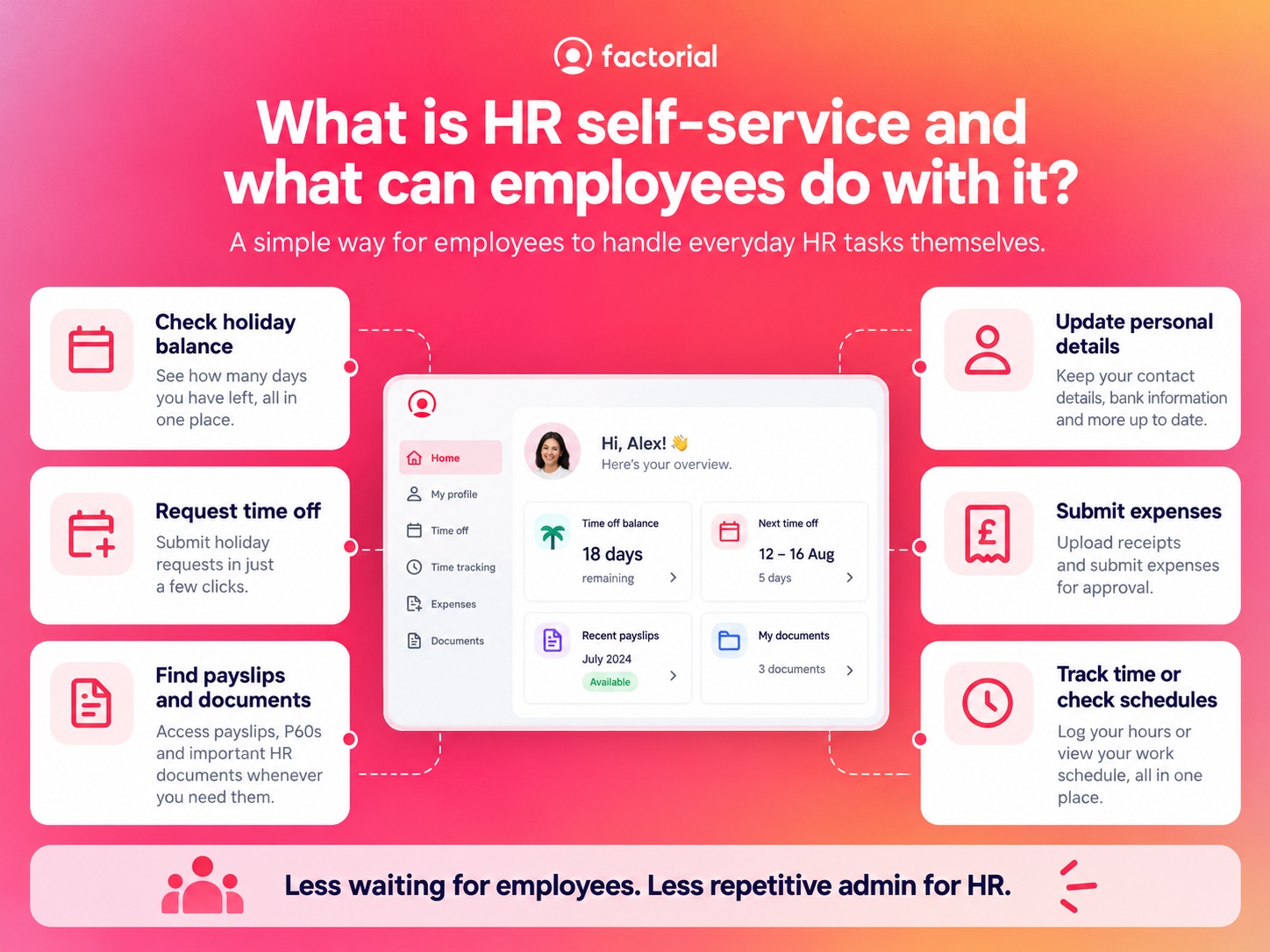
With HR self-service, employees may be able to:
- check their holiday balance
- request time off
- find payslips
- view their employment contract
- access company policies
- update their address or contact details
- change emergency contact information
- check schedules
- record working time
- submit expenses
- upload documents
- complete onboarding tasks
Managers can also use HR self-service tools to approve requests, check team information and manage everyday tasks without asking HR to do everything for them.
Using HR self-service is a better way of splitting work and delegating tasks. Employees handle straightforward tasks themselves, managers deal with the approvals they are responsible for, and HR can focus on the work that actually needs HR expertise.
How much admin can HR self-service remove?
The amount of admin that HR self-service removes depends on the company. A 30-person office will have very different needs from a 500-person business with shift workers across several different locations. But even small requests can add up quickly. Take holiday balances, for example.
When an employee asks HR how many days they have left. Someone from the HR team receives that question through a ticketing system, via email, or on Slack. They have to open the HR system or spreadsheet, check the balance and reply. The employee then emails again to request the holiday. HR may need to forward that request to a manager and update the record afterwards.
None of those steps takes very long on its own, but across hundreds of requests every year, they can take up a bigger amount of time that could be spent doing more useful work.
Giving employees HR self-service access to their own holiday balances can reduce those repetitive questions by around 85%. Combined with automated leave calculations and approvals, Factorial estimates in the Business Facts Index that handling leave requests manually can fall by around 70%.
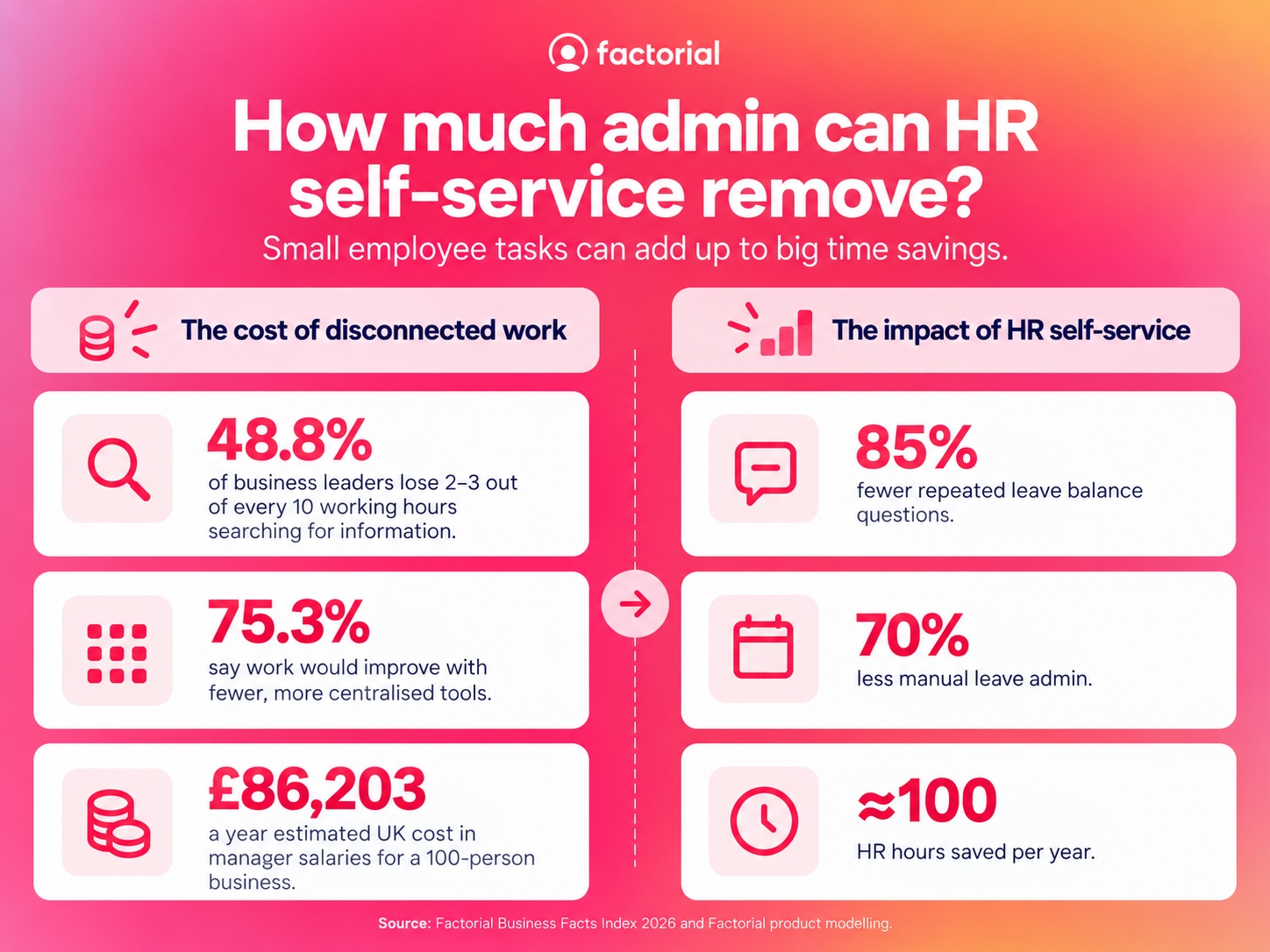
The Business Facts Index also found that 75.3% of surveyed European business leaders believe their company would work better with fewer, more centralised tools. For the UK, the report uses Office for National Statistics data to estimate the cost of time managers spend chasing information across disconnected tools.
For a UK business with 100 employees, the estimated cost is £86,203 a year in manager salaries alone. For a 1,000-person company, the estimate rises to £862,027.
HR self-service won’t reduce the cost to zero, but it tackles the problem of people wasting time asking someone else for information they could access themselves.
Which HR tasks work best with HR self-service?
HR self-service works best for frequent, straightforward tasks where the employee already has permission to access the information. The examples below are some of the clearest.
1. Checking holiday balances and requesting leave
Holiday management is one of the easiest places to see the value of HR self-service. Employees regularly want to know how much leave they have left. Without HR self-service, they may need to ask HR every time, but with HR self-service, they can see their balance themselves and send a request directly through the system.
The manager can then check team availability and approve or reject the request instead of HR stepping in to answer the balance question, forward the request and update a separate spreadsheet afterwards. It also gives employees a way to keep track of what they have already booked and what is still waiting for approval.
2. Finding payslips and work documents
Employees often contact HR because they need a document.
They might be looking for:
- a payslip
- their contract
- a salary change letter
- a company policy
- a training certificate
- another employment document
HR self-service lets employees find the documents they already have access to without asking HR to resend them, which saves time on both sides. An employee does not have to wait for somebody in HR to search for the file and HR does not have to stop what they are doing to find and send it.
Keeping documents together also makes employee records easier to manage. Our guide to employee records management explains how contracts, payroll information and other employment documents can be organised properly. If document storage is a wider issue in your business, see our guide to the best document management software.
3. Updating personal information
HR self-service can also remove admin when employees need to change their own information. When people move house, change their phone number, or need to update their emergency contact, they can do it easily through self-service.
Without HR self-service, the process may look like this:
- The employee emails HR.
- HR opens the employee record.
- HR copies the new information into the system.
- HR confirms that the change has been made.
With HR self-service, the employee can update certain details themselves or submit a change for approval. This helps comply with what the ICO says, which is that employers should take reasonable steps to make sure personal information about workers is accurate and kept up to date. HR self-service can make that easier because employees have more visibility over their own information. It gives them a chance to spot incorrect or outdated information in their own record.
4. Submitting and tracking expenses
Expenses can create a surprising amount of back-and-forth. An employee sends a receipt. The manager needs to approve it. Finance needs the right information. The employee then asks whether the expense has been approved or paid. HR self-service or employee self-service can make this process much clearer:
- The employee can upload the receipt, add the information and submit the expense themselves.
- The manager can approve it through the same process.
- The employee can also check the status without emailing somebody for an update.
That removes several small tasks from HR, finance and managers.
5. Recording hours and checking schedules
For some employees, HR self-service is something they may use every day.
Shift workers and hourly employees may use it to:
- clock in and out
- check their schedule
- review hours worked
- record breaks
- request corrections
- see upcoming leave
This gives employees direct access to information about their own working time. It also means HR does not need to collect paper timesheets or combine several spreadsheets for managers to see what is happening.
6. Finding policies and getting answers
Another big use of HR self-service is helping employees get answers to simple HR questions themselves.
For example, some of the most common HR questions:
- What is our travel policy?
- Can I carry holiday into next year?
- What expenses can I claim?
- Where is the parental leave policy?
- How many holiday days do I have left?
A basic HR self-service portal gives employees a place to find the policy or document, and AI can take this further by letting employees ask the question directly. That way, instead of searching through folders or reading a long document to understand policy, they can ask a simple question from One and get an answer based on the company’s own information.
7. Completing onboarding tasks
New starters create a lot of HR admin because so much information needs to move between the employee and the company. HR self-service lets the employee complete more of these tasks directly without involving HR or managers.
During onboarding, they may be able to:
- enter personal details
- upload documents
- read company policies
- sign paperwork
- complete assigned tasks
- find useful company information
Instead of HR sending several separate emails and manually collecting every document, the employee has one place to complete the process. Our guide to employee onboarding best practices explains how to make the entire process easier for both HR and new starters.
What makes HR self-service actually work?
HR self-service only saves time if employees actually use it. If the system is difficult to understand, people will keep emailing HR instead.
Employees need one clear place to go
Self-service becomes much less useful when employees need separate tools and passwords for everything. When they have one tool for holiday requests, another for signing documents, another for submitting expenses and even a shared drive for policies, things can get overwhelming. People should know where to go when they need something.
The information has to be up to date
Employees will stop trusting HR self-service if the information is wrong. If their holiday balance is incorrect or their latest contract is missing, they will contact HR anyway. The information behind the portal needs to stay current. If HR has to constantly update this info manually, it very nearly defeats the purpose of having self-service.
Common tasks should be easy to find
An employee should not have to click through ten menus to download a payslip. HR self-service should make the common tasks obvious. Holiday, documents, personal details, time and expenses should be easy to find from the employee’s own profile.
Permissions need to be clear
HR self-service does not mean employees should have access to everything. An employee should see their own information. A manager should see the information they need about their team. HR may need wider access. Most importantly, for data protection, sensitive information needs tighter controls. Your system for self-service should let you set permissions. That way, employees can complete more tasks themselves without giving them access to information they should not see.
Which tasks should stay with HR?
HR self-service is best for routine tasks. Some situations still need a person with expertise in charge.
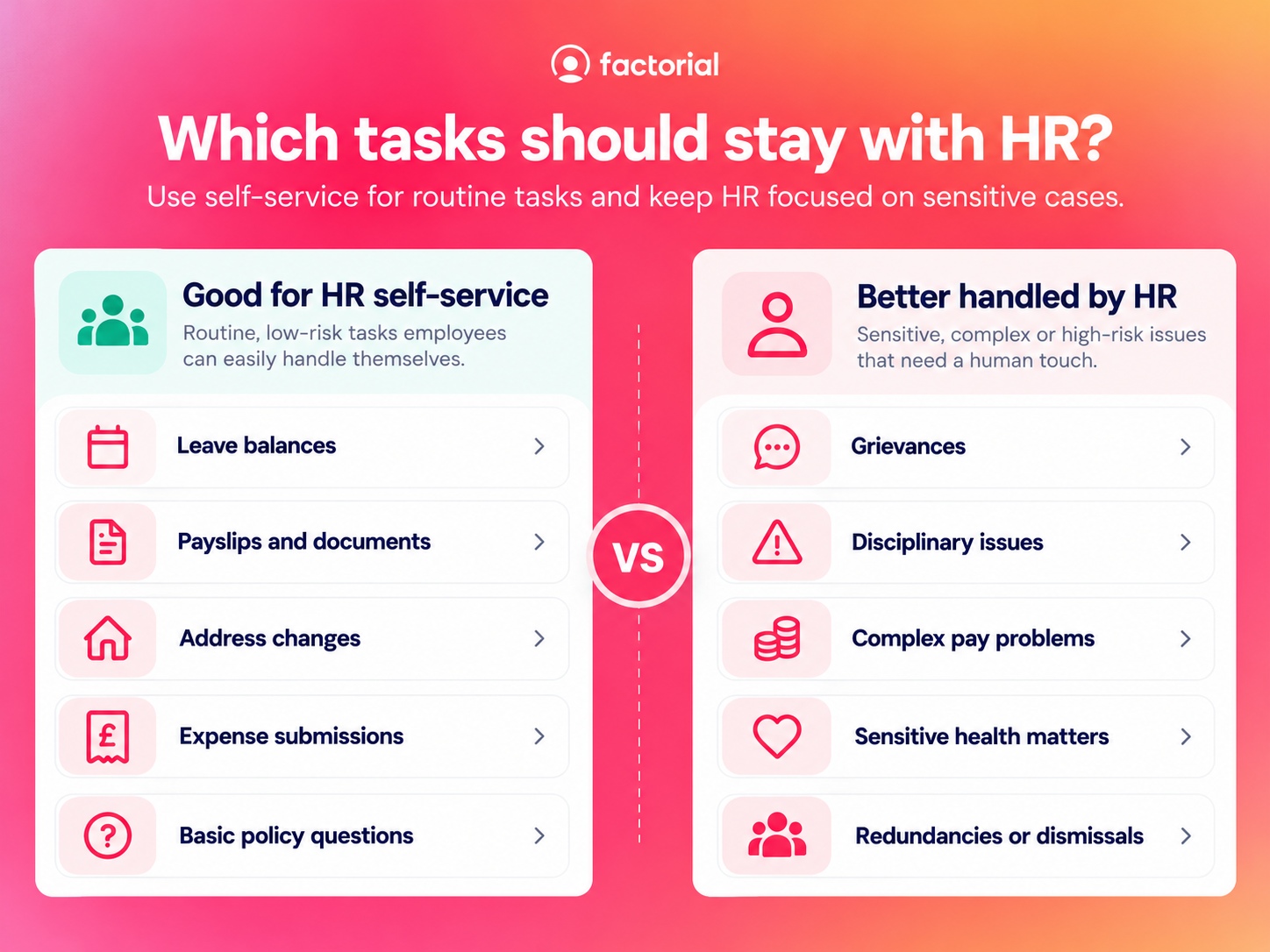
HR should normally remain closely involved in areas such as:
- grievances
- disciplinary issues
- complex pay problems
- sensitive health matters
- reasonable adjustments
- difficult absence cases
- workplace conflict
- redundancies and dismissals
- questions where the policy is unclear
HR self-service should make it easier to deal with straightforward tasks so HR has more time for situations that require more oversight.
How does Factorial make HR self-service easier?
Factorial is an AI business management platform that gives employees one place to access information and complete everyday HR tasks. With Factorial’s employee portal, employees can check time off, find documents and view their own information without contacting HR.
Factorial One makes this even easier. Employees can ask questions in normal language and get answers based on the company information they already have access to. This means less searching, fewer emails to HR and a simpler employee experience.

FAQs about HR self-service
HR self-service lets employees handle simple HR tasks themselves. This can include checking holiday, finding documents, updating personal details or submitting expenses without asking HR each time.
A simple example is an employee checking their own holiday balance in an HR system instead of emailing HR to ask for it. In Factorial's case, the employee can even ask One for the answer.
In HR, self-service is often called employee self-service or ESS. It can also refer to an employee portal when that portal lets people manage their own information and tasks.
Employee self-service is a system that gives employees direct access to their own HR information and common tasks. They may be able to view documents, update details, request leave or check schedules.
You usually access self-service through your company’s HR platform or employee portal. Your employer should give you a login or link to the system your company uses.